FreeBSD
On FreeBSD
Putting ccache on a backed RAM disk to speed compiles
Why do this
Compiling and building ports can be meaningfully accelerated by caching (ccache) certain intermediate results and by moving work directories from slower media to faster (tmpfs /tmp). If you do regular builds, such as one might on a poudriere server, there can be a meaningful write workload to the working directory which uses up SSD life, possibly meaningfully (though probably not really that much if your SSD is modern and big).
If you have a fast, high endurance SSD, putting ccache on it won’t do much. If ccache is going on rotating media, this config will speed up builds appreciably. The save/restore code below will preserve the ccache across reboots and leaves file management inside the ccache directory to ccache itself, while managing the persistence of any other random files that get written outside the directory.
Note this code, different than other examples I’ve found, works with FreeBSD as a service and doesn’t flush files that are accessed (read) between reboots, only files that aren’t touched in any way and therefore can (probably) be evicted without penalty and prevents cruft and clutter on the RAM disk accumulating because it has been made non-volatile.
Putting the workdirectory into a RAM-based tmpfs should speed up builds even compared to a fast SSD, as SSD write times aren’t a strong feature of SSDs. There’s no persistence code as there’s no expectation that the work directories will persist.
Setup ccache
Setting up ccache is pretty easy. First, install it from ports. If you’re using binary packages, you obviously don’t need ccache.
cd /usr/ports/devel/ccache
make install clean
make.conf
Append a few lines to your make.conf files like so:
nano /etc/make.conf
nano /usr/local/etc/poudriere.d/FBSD_14-0-R-make.conf
Add the following:
CCACHE_DIR=/ram/ccache
WITH_CCACHE_BUILD=yes
# WRKDIRPREFIX="/tmp/ports"
note that WRKDIRPREFIX (to use tmpfs /tmp, see below) seems to conflict with the same directive in poudriere.conf so comment out for poudriere hosts or don’t use the option in poudriere.
poudriere.conf
nano /usr/local/etc/poudriere.conf
CCACHE_DIR=/ram/ccache
/etc/fstab
Next, make the /ram directory and set a limit of how much RAM it can use. 12884901888 is 12GB. Somewhere between 8 and 16GB is probably sufficient for most needs. After a few builds, I was using 1.3GB.
mkdir /ram
nano /etc/fstab
none /ram tmpfs rw,size=12884901888 0 0
mount /ram
ccache.conf
nano /root/.ccache/ccache.conf
nano /usr/local/etc/ccache.conf
cache_dir = /ram/ccache
max_size = 12G
status
Now all ports you build will be compiled entirely in RAM. You can check your ccache usage with:
ccache -s
CREATE A CACHE STORE/RESTORE SCRIPT
From: https://forums.gentoo.org/viewtopic-t-838198-start-0.html
This is in /etc/rc.d and should be executed on startup and shutdown, but only actual shutdown not reboot or halt. The correct command to reboot (and preserve /ram) is (you do not need to do this now!):
shutdown -r now
Don’t reboot now, just know that using “reboot” or some other command other than calling shutdown will not call the stop script and won’t sync the cache to NV storage.
Create /etc/rc.d/syncram something like:
#!/bin/sh -
# PROVIDE: syncram
# REQUIRE: FILESYSTEMS
# KEYWORD: nojail shutdown

. /etc/rc.subr

name="syncram"
rcvar="syncram_enable"
desc="rsync ram disk from/to var on startup/shutdown"
stop_cmd="${name}_stop"
start_cmd="${name}_start"

syncram_start()
{
# rsync data from persistent storage to ram disk on boot
# preserving all file attributes
logger syncram-start
/usr/local/bin/rsync -a -A -X -U -H -x \
/var/tmp/syncram/ /ram \
> /dev/null 2>/var/log/syncram-store.log
touch /var/tmp/syncram/.lastsync
}

syncram_stop()
{
# rsync data from ramdisk to persistent storage on shutdown
# preserving all file atributes
logger syncram-stop
#!/bin/sh
# if the dest dir doesn't exist, create it
if [ ! -d /var/tmp/syncram ]; then
mkdir /var/tmp/syncram
fi
# flush any accumulated cruft that weren't accessed since the last sync
# note tmpfs records accurate atime
if [ -f /ram/.lastsync ]; then
find /ram -type f ! -neweram /var/tmp/syncram/.lastsync -delete
fi
# rsync new or accessed removing unused from target
/usr/local/bin/rsync -a -A -X -U -H -x -m -del \
/ram/ /var/tmp/syncram \
> /dev/null 2>/var/log/syncram-restore.log
}

load_rc_config $name
run_rc_command "$1"
chmod +x syncram
Then edit /etc/rc.conf to include
syncram_enable="YES"
and execute
service syncram onestart
Bonus: tmpfs for working builds
tmpfs can also be used to create a similar ramdisk at the /tmp mount point where it is fairly automatically used by poudriere to speed up builds. There’s a quirk that seems to be a problem (not fully debugged, but the config described here works and survives reboots): putting the WRKDIRPREFIX in make.conf AND in poudriere.conf seems to yield “workdirectory” errors so pick one for the directive and probably pick poudriere.conf if you’re running poudriere.
poudriere.conf
nano /usr/local/etc/poudriere.conf
# Use tmpfs(5)
# This can be a space-separated list of options:
# wrkdir - Use tmpfs(5) for port building WRKDIRPREFIX
# data - Use tmpfs(5) for poudriere cache/temp build data
# localbase - Use tmpfs(5) for LOCALBASE (installing ports for packaging/testing)
# all - Run the entire build in memory, including builder jails.
# yes - Enables tmpfs(5) for wrkdir and data
# no - Disable use of tmpfs(5)
# EXAMPLE: USE_TMPFS="wrkdir data"
USE_TMPFS=yes

# How much memory to limit tmpfs size to for *each builder* in GiB
# (default: none)
#TMPFS_LIMIT=4

# List of package globs that are not allowed to use tmpfs for their WRKDIR
# Note that you *must* set TMPFS_BLACKLIST_TMPDIR
# EXAMPLE: TMPFS_BLACKLIST="rust"
TMPFS_BLACKLIST="rust"

# The host path where tmpfs-blacklisted packages can be built in.
# A temporary directory will be generated here and be null-mounted as the
# WRKDIR for any packages listed in TMPFS_BLACKLIST.
# EXAMPLE: TMPFS_BLACKLIST_TMPDIR=${BASEFS}/data/cache/tmp
TMPFS_BLACKLIST_TMPDIR=${BASEFS}/data/cache/tmp
Rust may overflow even a chonky RAM config.
/etc/fstab
nano /etc/fstab
tmpfs /tmp tmpfs rw,mode=1777 0 0
This will “intelligently” allocate remaining RAM to the tmpfs mounted at /tmp and builds should mostly happen there.
mount -a
NB
There’s a risk that screwing around with /etc/fstab will break boot – if the system reboots to single user mode, get shell, navigate to /etc/fstab and check for errors or comment out the lines and reboot again.
Never put important data on anyone else’s hardware. Ever.
In early January, 2021, two internet services provided unintentional and unequivocal demonstrations of the intrinsic trade-offs between running one’s own hardware and trusting “The Cloud.” Parler and Gab, two “social network” services competing for the white supremacist demographic both came under fire in the wake of a violent insurrection against the US government when the plotters used their platforms (among other less explicitly extremist-friendly services) to organize the attack.
Parler had elected to take the expeditious route of deploying their service on AWS and discovered just how literally the cloud is metaphorically like atmospheric clouds—public and ephemeral—when first their entire data set was extracted and then their services were unilaterally terminated by AWS knocking them completely offline (except, of course, for the exfiltrated data, which is still online and being combed by law enforcement for evidence of sedition.)
Gab owns their own servers and while they had trouble with their domain registrar, such problems are relatively easy to resolve: Gab remains online. Gab did face the challenge of rapid scaling as the entire right-wing extremist market searched for a safe haven away from the fragile Parler and from the timid and begrudging regulation of hate speech and calls for immediate violence by mainstream social networks in the fallout over their contributions to the insurrection and other acts of right-wing terrorism.
In general customers who engage cloud service providers rather than self-hosting do so to speed deployment, take advantage of easy scalability (up or down), and offload management of common denominator infrastructure to a large-scale provider, all superficially compelling arguments. However convenient this may seem, it is rarely a good decision and fails to rationally consider some of the intrinsic shortcomings, as Parler discovered in rather dramatic fashion, including loss of legal ownership of the data on those services, complete abdication of control of that data and service, and an intrinsic and inescapable misalignment of business interests between supplier and customer.
Anyone considering engaging a cloud service provider for a service that results in proprietary data being stored on third party hardware or on the provision of a business critical service by a third party should ensure contractual obligations with well defined penalties explicitly match the implicit expectations of privacy, stewardship, suitability of service, and continuity and that failures are actionable sufficient to make whole the client in the event of material breach.
Below is a list of questions I would have for any cloud provider of any critical service. In general, if a provider is willing to even consider answering the results will be shockingly unsatisfactory. Every company that uses a cloud service, whether it is hosting on AWS or email provisioning by Google or Microsoft is a Parler waiting to happen: all of your data exposed and then your business terminated. Cloud services are acceptable only for insecure data and for services that are a convenience, not a core requirement.
Like clouds in the sky, The Cloud is public and ephemeral.
A: A first consideration is data protection and privacy:
What liability does The Company, and employees of The Company individually, have should they sell or lose control of The Customer’s data? What compensation will The Customer receive if control of The Customer’s data is lost? Please clarify The Company’s criminal and civil liabilities and contractual obligations under the following scenarios:
1) A third party exfiltrates The Customer’s data entrusted to The Company’s care in an unauthorized manner.
2) An employee of The Company willfully misuses The Customer’s data entrusted to The Company in any way.
3) The Company disposes of equipment in a manner which makes The Customer’s data entrusted to The Company accessible to third parties.
4) The company receives a National Security Letter (NSL) requesting information pertaining to The Customer or to others who have data about The Customer on The Company’s service.
5) The company receives a warrant requesting information pertaining to The Customer or to others who have data regarding The Customer on The Company’s service.
6) The company receives a subpoena requesting information pertaining to The Customer or to others who have data regarding The Customer on The Company’s service that is opened or has been in stored on their hardware for more than 180 days.
7) The company receives a civil discovery request for information pertaining to The Customer or to others who have data regarding The Customer on The Company’s service.
8) The company sells or provides access to The Customer’s data or meta information about The Customer or The Customer’s use of The Company’s system to a third party.
9) The Company changes their terms of service at some future date in a way that is inconsistent with the terms agreed to at the time of The Customer’s engagement of the services of The Company.
10) The Company fails to inform The Customer of a breach of control of The Customer’s data.
11) The Company fails to inform The Customer in a timely manner of a change in policy regarding third party access to The Customer’s data.
12) The Company erroneously exposes The Customer’s data to third party access due to negligence or incompetence.
B: A second consideration is a serial dependency on the reliability of The Company’s service to The Customer’s activity:
By relying on The Company’s service, The Customer typically will rely on the performance and availability of The Company’s products. If The Company product fails or fails to provide service as expected, The Customer may incur losses, including direct financial losses, loss of reputation, loss of convenience, or other harms. What warranty does The Company make in the performance of their services? What recourse does The Customer have for recovery of losses should The Company fail to perform?
Please provide details on what compensation The Company will provide in the following scenarios:
1) The Company can no longer perform the agreed and expected services due to reasons beyond The Company’s control.
2) The Company’s service fails to meet expectations in way that causes a material loss to The Customer.
3) The Company suffers an extended outage or compromise of service that exceeds a reasonable or agreed maximum accepted duration.
C: A third consideration is the alignment of interests between The Customer and The Company which may not be complete and may diverge in the future:
Engagement of the services of The Company requires an investment of time and resources on the part of The Customer in excess of any fees The Company may charge to adopt The Company’s products and services. What compensation will be provided should The Company’s products fail to meet performance and utility expectations? What compensation will be provided should expenditure of resources be required to compensate for The Company’s failure to meet service expectations?
Please provide details on what compensation The Company will provide in the following scenarios:
1) The Company elects to no longer perform the agreed and expected services due to business decisions made by The Company.
2) Ownership or control of The Company changes to an entity that is not aligned with the values of The Customer and which The Customer can not support, directly or indirectly.
3) Control of The Company passes to a third party e.g. through an acquisition or change of control of the board and which results in use of The Customer’s data in a way that is unacceptable to The Customer.
4) The Company or employees of The Company are found to have engaged in behavior, speech, or conduct which is unacceptable to The Customer.
5) The Company’s products or services are found to be unacceptable to The Customer for any reason not limited to security flaws, missing features, access failures, lack of performance, etc and The Company is not able to or is unwilling to meet The Customer’s requirements in a timely manner.
If your company depends on third party provisioning of IT services, you’re just one viral tweet¹ away from being out of business. Build an IT department that knows how to use a command line and run your critical services on your own hardware.
1) “Toot” now. Any company that relied on Twitter should review this post, but given the rumors around unpaid hosting bills, the chances of recovering any losses from Twitter are dim. At least those businesses that built models around Reddit APIs share your pain.
EZ rsync cheat sheet
Rsync is a great tool – incredibly powerful for synchronizing directories, copying over a network or over SSH, an awesome way to backup a mobile device back to a core network securely and other great functions. it works better than just about anything else developed before or since, but is a command line UI that is easy to forget if you don’t use it for a while and Windows is a challenge.
This isn’t meant to be a comprehensive guide, they’re are lots of those, but a quick summary of what I find useful.
There’s one confusing thing that I have to check often to be sure it is going to do what I think it should – the trailing slash on the source. It works like this:
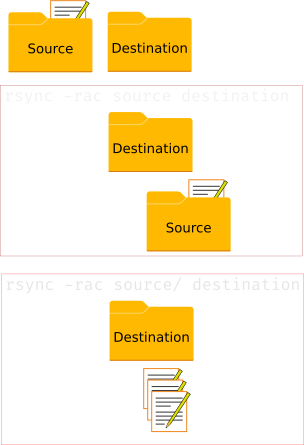
A quick summary of useful command options (there are many, many) is:
-v, --verbose               increase verbosity
-r, --recursive             recursive (go into subdirectories)
-c, --checksum              skip based on checksum, not mod-time & size (slow, but accurate)
-a, --archive               archive mode; equals -rlptgoD (no -H,-A,-X) (weird with SMB/CIFS)
-z, --compress              compress file data during the transfer, should help over slow links
-n, --dry-run               trial run, don't move anything
-h, --human-readable        display the output numbers in a human-readable format
-u, --update                only copy files that have different sizes and equal or later modification times (-c will enable checksum comparison)
    --progress              show the sync progress during transfer
    --exclude ".*"          exclude files starting with "."
    --remove-source-files   after synced, empty the dir (like mv/merge)
    --delete                any files in dest that aren't in source are deleted in destination (danger)
    --info=progress2 --info=name0  This yields a pretty usable one line progress meter.
I do not recommend using compression (-z) on a LAN, it’ll probably slow you down. Over a slower (typically) WAN link it usually helps, but YMMV depending on link and CPU speed. Test it with that one line progress meter if it is a long enough sync to matter – it shows transfer rate a little like this:
1,770,984,121 2% 747.54kB/s 27:46:38 xfr#2159, ir-chk=1028/28648)
If the files really have to be accurately transferred, the checksum (-c) option is critical – every copy (or at least “move”) function should include this validation, especially before deleting the original.
Integrate Fail2Ban with pfSense
Fail2Ban is a very nice little log monitoring tool that is used to detect cracking attempts on servers and to extract the malicious IPs and—do the things to them—usually temporarily adding the IP address of the source of badness to the server’s firewall “drop” list so that IP’s bad packets are lost in the aether. This is great, but it’d be cool to, instead of running a firewall on every server each locally detecting and blocking malicious actors, to instead detect across all services and servers on the LAN and push the results up to a central firewall so the bad IPs can’t reach the network at all. This is one method to achieve that goal.
NOTE: pfBlockerNG v3.2.0_3 adding a “_v4” suffix to the auto-generated IPv4 aliases. The shell script that runs on pfSense to update the alias via pfctl should be modified to match.
I like pfSense as a firewall and run FreeBSD on my servers; I couldn’t find a prebuilt tool to integrate F2B with pfSense, but it wasn’t hard to hack something together so it worked. Basically I have F2B maintain a local “block list” of bad IPs as a simple text file which is published via Apache from where pfSense’s grabs it and applies it as a LAN-wide IP filter. I use the pfSense package pfBlockerNG to set up the tables but in the end a custom script running on the pfSense server actually grabs the file and updates the pfSense block lists from it on a 1 minute cron job.
There are plenty of well-written guides for getting F2B working and how to configure it for jails; I found the following useful:
- https://www.digitalocean.com/community/tutorials/how-fail2ban-works-to-protect-services-on-a-linux-server
- https://dan.langille.org/2015/05/10/wordpress-and-fail2ban/
- https://forums.freebsd.org/threads/fail2ban-with-jails.49150/
- https://protectli.com/kb/how-to-setup-pfblockerng/
- https://synaptica.info/en/2019/06/09/pfsense-cron-iterface/
Note that this how-to assumes you have or can get F2B working and that you’ve got pfSense working and know how to install packages (like pfBlockerNG). I did not find sufficient detail in any one of the above sources to make setting it up a copy-pasta experience, but in aggregate it worked out.
The basic model is:
- Internet miscreants try to hack your site leaving clues in the log files
- Fail2Ban combs the log files to determine which IPs are are associated with sufficiently bad (and sufficiently frequent) behavior, which is normally used to update the host’s local firewall block list, adding and removing miscreant IPs according to rules defined in
.localjail scripts. - Instead of updating the firewall’s
iptableslist, a custombanactionscript (see below) instead writes the IPs to a list that is published to the LAN by a web server (or to the world, if you want to share). - pfSense, running on a different server, is configured to pull that list of miscreant IPs into pfBlockerNG as a standard IPv4 (in my case, IPv6 is also possible) block list.
- To get around pfBlockerNG’s too slow maximum update rate of 1 hour, a bash script runs on an every minute cron job on the pfSense server to
curlthe list over and update pfSense’spfctl(packet filter control) directly, which to some extent bypasses fail2ban other than letting it maintain the aliases and stats. - Packets from would be evildoers evaporate at the firewall.
This model is federatable – that is sites can make their lists accessible either via authenticated (e.g. client cert or scp) or open sharing of dynamic lists. This might be a nice thing as some IP block lists have gone offline or become subscription only. Hourly (or less frequent) updates would require only subscribing to someone’s HTTP/FTP published F2B dynamic miscreant list in pfBlockerNG or by adding bash/cron jobs to update more frequently.
I do not publish my list because it would seem to provide a bit of extra information to an attacker, but if someone with a specific IP that can be allowed wants it, I’m happy to except that IP.
The custom bits I did to get it to work with pfSense are:
Custom F2B Action
On the protected side, I modified the “dummy.conf” script to maintain a list of bad IPs as a banaction in an Apache served location that pfSense could reach. F2B manages that list, putting bad IPs in “jail” and letting them out as in any normal F2B installation—but instead of using the local server’s packet filter as the banaction, they’re pushed to a web-published text list. This list contains any IP that F2B has jailed, whether in the SSH jail or the Apache jail or the Postfix jail or whatnot based on banactions per jail.local config. Note that until the pfSense part of the process is set up, F2B is only generating a web-published list of miscreants trying to hack your system.
# Fail2Ban configuration file
#
# Author: David Gessel
# Based on: dummy.conf by Cyril Jaquier
#

[Definition]

# Option:  actionstart
# Notes.:  command executed on demand at the first ban (or at the start of Fail2Ban if actionstart_on_demand is set to false).
# Values:  CMD
#


actionstart = if [ -z '<target>' ]; then
                  touch <target>
                  printf %%b "# <init>\n" <to_target>
                  fi
              chmod 755 <target>
              echo "%(debug)s started"

# Option:  actionflush
# Notes.:  command executed once to flush (clear) all IPS, by shutdown (resp. by stop of the jail or this action)
# Values:  CMD
#

actionflush = if [ ! -z '<target>' ]; then
                  rm -f <target>
                  touch <target>
                  printf %%b "# <init>\n" <to_target>
                  fi
              chmod 755 <target>
              echo "%(debug)s clear all"

# Option:  actionstop
# Notes.:  command executed at the stop of jail (or at the end of Fail2Ban)
# Values:  CMD
#
actionstop = if [ ! -z '<target>' ]; then
                  rm -f <target>
                  touch <target>
                  printf %%b "# <init>\n" <to_target>
                  fi
             chmod 755 <target>
             echo "%(debug)s stopped"

# Option:  actioncheck
# Notes.:  command executed once before each actionban command
# Values:  CMD
#
actioncheck =

# Option:  actionban
# Notes.:  command executed when banning an IP. Take care that the
#          command is executed with Fail2Ban user rights.
# Tags:    See jail.conf(5) man page
# Values:  CMD
#

actionban = printf %%b "<ip>\n" <to_target>
            sed -i '' '/^$/d' <target>
            sort -u  -n -t . -k 1,1 -k 2,2 -k 3,3 -k 4,4 <target> -o <target>
            chmod 755 <target>
            echo "%(debug)s banned <ip> (family: <family>)"

# Option:  actionunban
# Notes.:  command executed when unbanning an IP. Take care that the
#          command is executed with Fail2Ban user rights.
# Tags:    See jail.conf(5) man page
# Values:  CMD
#

# flush the IP using grep which is supposed to be about 15x faster than sed
# grep -v "pattern" filename > filename2; mv filename2 filename


actionunban = grep -v "<ip>" <target> > <temp>
              mv <temp> <target>
              chmod 755 <target>
              echo "%(debug)s unbanned <ip> (family: <family>)"


debug = [<name>] <actname> <target> --

[Init]

init = BRT-DNSBL

target = /usr/jails/claudel/usr/local/www/data-dist/brt/dnsbl/brtdnsbl.txt
temp = <target>.tmp
to_target = >> <target>
The target has to be set for your web served environment (this would be FreeBSD default host root). I’ve configured mine to be visible on the LAN only via .htaccess in the webserverroot/dnsbl/ directory.
AuthType Basic
Order deny,allow
Deny from all
allow from 127.0.0.1/8 10
Then you need to call this as a banaction for the infractions that will get miscreants blocked at pfSense, for example in ./jail.local you might modify the default ban action to be:
# Default banning action (e.g. iptables, iptables-new,
# iptables-multiport, shorewall, etc) It is used to define
# action_* variables. Can be overridden globally or per
# section within jail.local file
banaction = brtdnsbl
#banaction_allports = iptables-allports
or say in ./jail.d/sshd.local you might set
[sshd]
enabled   = true
filter    = sshd
banaction = brtdnsbl
maxretry  = 2
findtime  = 2d
bantime   = 30m
bantime.increment = true
bantime.factor = 2
bantime.maxtime = 10w
logpath = /var/log/auth.log
But do remember to set your ignoreip as appropriate to prevent locking yourself out by having your own IP end up on the bad guy list. You can make a multi-line ignoreip block like so:
ignoreip = 127.0.0.1/8 ::1 10.0.0.0/8 12.114.97.224/27 15.24.60.0/23
 22.31.214.140 13.31.114.141 75.106.28.144 125.136.28.0/23
 195.170.192.0/19 72.91.136.167 24.43.220.14 18.198.235.171 17.217.65.19
That is put a leading space on continuation lines following the ignoreip directive. This isn’t documented AFAIK, so it might break, but works as of fail2ban version 0.11.2_3
Once this list is working (check by browsing to your list):
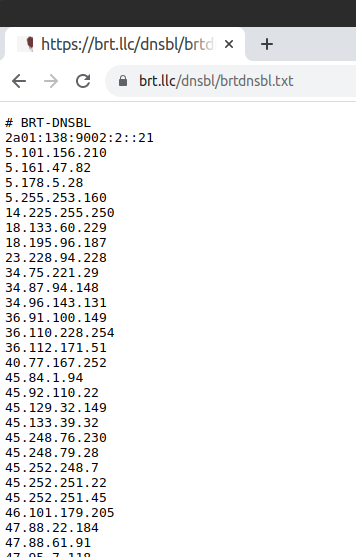
then move to the pfSense side to actually block these would be evildoers and scriptkiddies.
Set up pfBlockerNG
The basic setup of pfBlockerNG is well described, for example in https://protectli.com/kb/how-to-setup-pfblockerng/ and it provides a lot of useful blocking options, particularly with externally maintained lists of internationally recognized bad actors. There are two basic functions, related but different:
DNSBL
Domain Name Service Block Lists are lists of domains associated with unwanted activity and blocking them at the DNS server level (via Unbound) makes it hard for application level services to reach them. A great use of DNSBLs is to block all of Microsoft’s telemetry sites, which makes it much harder for Microsoft to steal all your files and data (which they do by default on every “free” Windows 10 install, including actually copying your personal files to their servers without telling you! Seriously. That’s pretty much the definition of spyware.)
It also works for non-corporate-sponsored spyware, for example lists of command and control servers found for botnets or ransomware servers. This can help prevent such attacks by denying trojans and viruses access to their instruction servers. It can also easily help identify infected computers on the LAN as any blocked requests are sent to what was supposed to be a null address and logged (to 1.1.1.1 at the moment, which is an unfortunate choice given that is now a well-reputed DNS server like Google’s 8.8.8.8 but, it seems, without all the corporate spying.) There is a bit of irony in blocking lists of telemetry gathering IPs using lists that are built using telemetry.
Basically DNSBLs prevent services on the LAN from reaching nasty destinations on the internet by returning any DNS request to look up a malicious domain name with a dead-end IP address. When your windows machine wants to report your web browsing habits to microsoft, it instead gets a “page not found” error.
IPBL: what this process uses to block baddies
This integration concept uses an IPBL, a list of IP addresses to block. An IPBL works at a lower level than a DNSBL and typically is set up to block traffic in both directions—a script kiddie trying to brute force a password can be blocked from reaching the target services on the LAN, but so too can the reverse direction be blocked—if a malicious entity trips F2B, not only are they blocked from trying to reach in, so too are any sneaky services on your LAN blocked from reaching out to them on the internet.
All we need to do is get the block list F2B is maintaining into pfSense. pfBlockerNG can subscribe to the list URL you set above easily enough just like any other IPv4 block list but the minimum update time is an hour.
My IPv4 Settings for the Fail2Ban list look like this:
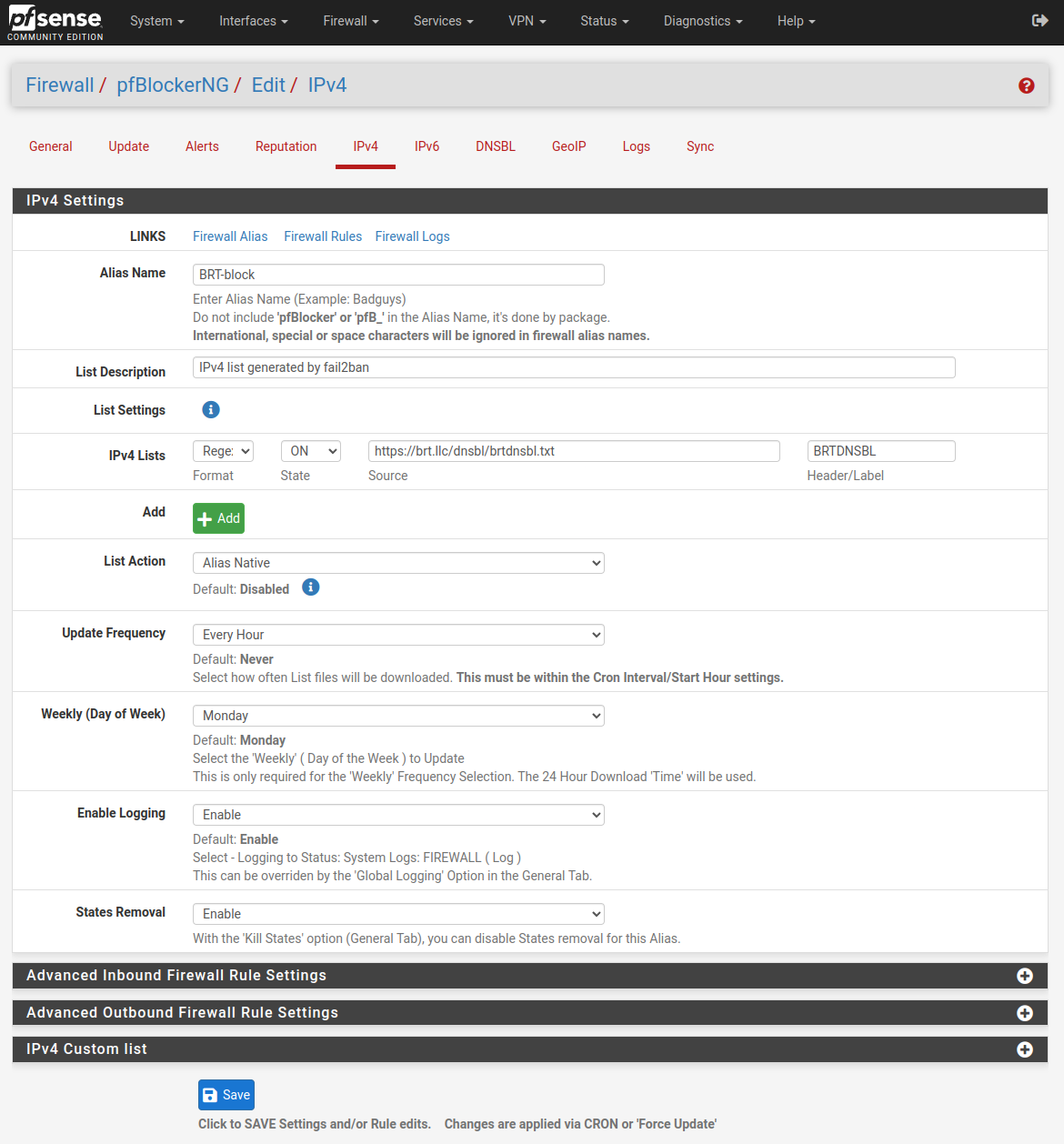
An hour is an awfully long time to let someone try to guess passwords or flood your servers with 404 requests or whatever else you’re using F2B to detect and stop. So I wrote a simple script that lives on the pfSense server in the/root/custom directory (which isn’t flushed on update) and that executes a few simple commands to grab the IP list F2B maintains, do a fairly trivial grep to exclude any non-IP entries, and use it to update the packet filter drop lists via pfctl:
/root/custom/brtblock.sh
#!/usr/bin/env sh
# set -x # uncomment for "debug"

# Get latest block list
/usr/local/bin/curl -m 15 -s https://brt.llc/dnsbl/brtdnsbl.txt > /var/db/pfblockerng/original/BRTDNSBL.orig
# filter for at least semi-valid IPs.
/usr/bin/grep  -Eo '[0-9]{1,3}\.[0-9]{1,3}\.[0-9]{1,3}\.[0-9]{1,3}' /var/db/pfblockerng/original/BRTDNSBL.orig > /var/db/pfblockerng/native/BRTDNSBL.txt
# update pf tables
# for pfBlockerNG ≤ v3.2.0_3, omit the _v4 suffix shown below
/sbin/pfctl -t pfB_BRTblock_v4 -T replace -f /var/db/pfblockerng/native/BRTDNSBL.txt > /dev/null 2>&1
HT to Jared Davenport for helping to debug the weird /env issues that arise when trying to call these commands directly from cron with the explicit env declaration in the shebang. Uncommenting the set -x directive will generate a verbose output for debugging. Getting this script onto your server requires ssh access or console access. If you’re adventurous it can be entered from the Diagnostics→Command Prompt tool.
Preventing Self-Lockouts at pfSense
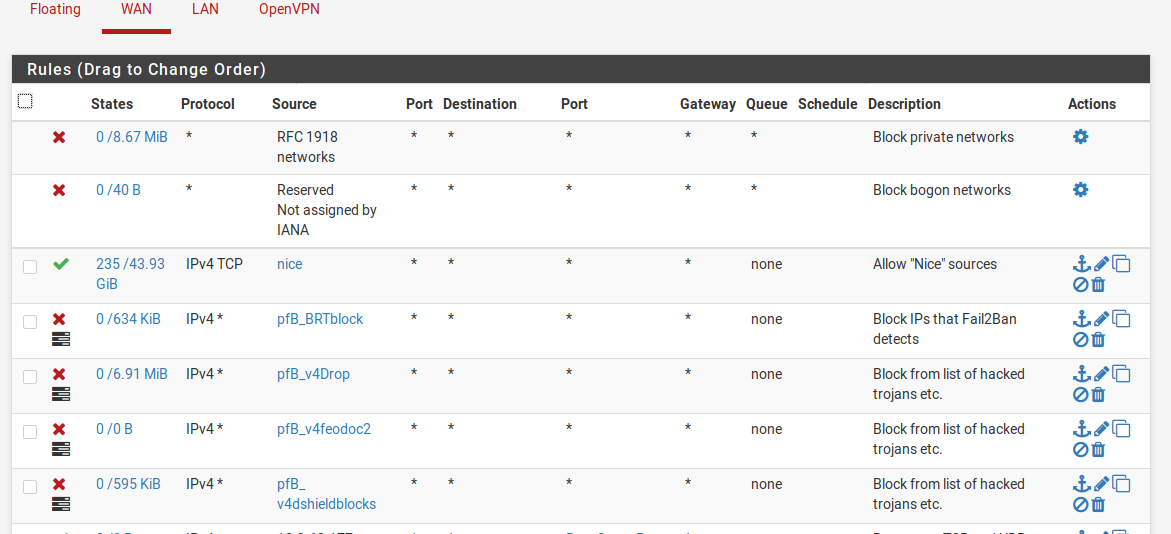
One of the behaviors of pfBlockerNG that the dev seems to think is a feature is automatic filter order management. This overrides manually set filter orders and will put pfB’s block filters ahead of all other filters, including, say, allow filters of your own IPs that you don’t want to ever be locked out in case you forget your passwords and accidentally trigger F2B on yourself. This will override your own reordering. If this default behavior doesn’t work for you, then use a non-default setting for IPv4 block lists and make all IP block list “action” types “Alias_Native.”
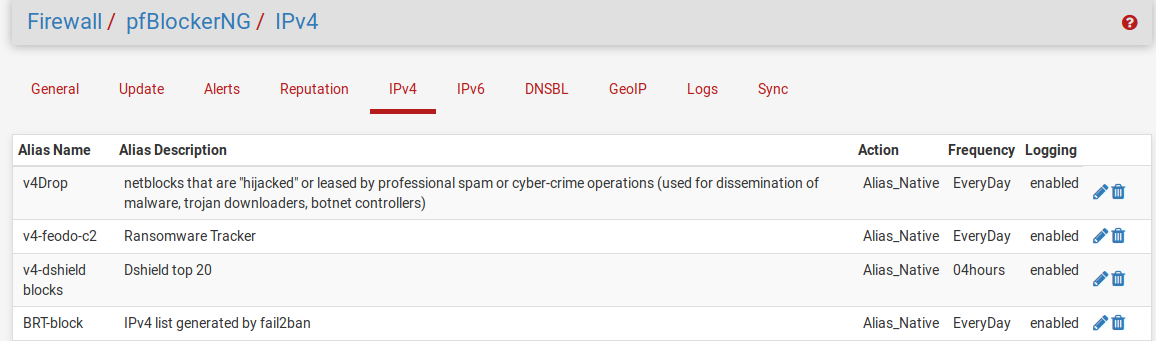
To use Alias_Native lists, you write your own per-pfBlockerNG alias filter (typically “drop” or “reject”) and then pfBlockerNG won’t auto-order them for you on update. We let pfBlockerNG maintain the alias list at something like pfB_BRTblock (the pfB_ prefix is added by pfBlockerNG) which we then use like any other alias in manual firewall rule:
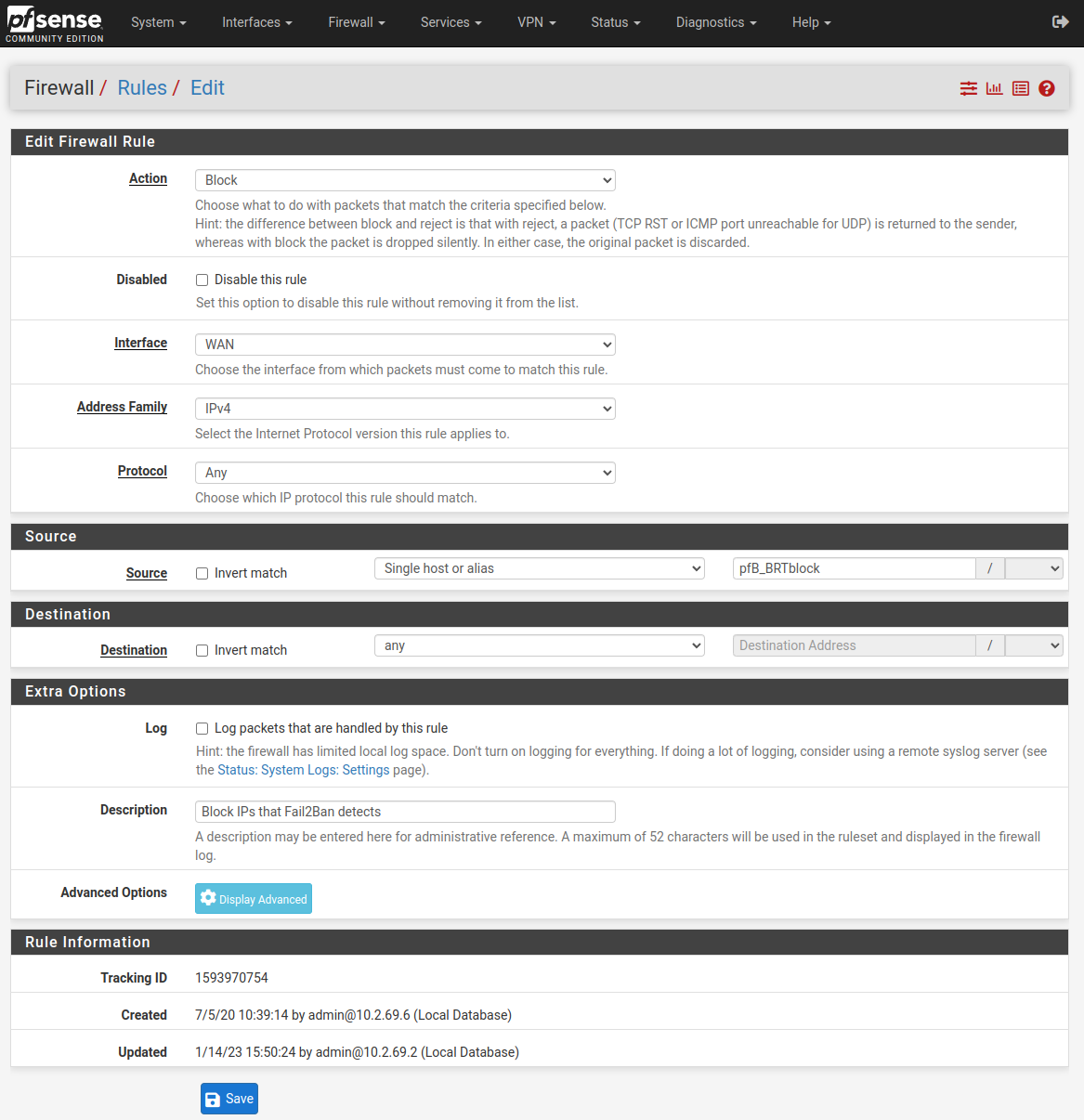
So the list of rules looks like this:
Cron Plugin
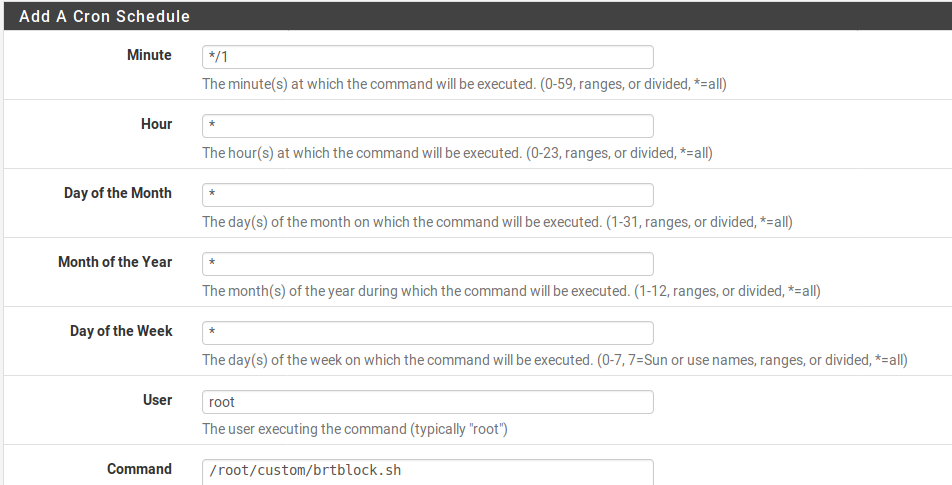
The last ingredient is to update the list on pfSense quickly. pfSense is designed to be pretty easy to maintain so it overwrites most of the file structure on upgrade, making command line modifications frustratingly transient. I understand that /root isn’t flushed on an upgrade so the above script should persist inside the /root directory. But crontab -e modifications just don’t stick around. To have cron modifications persist, install the “Cron” package with the pfSense package manager. Then just set up a cron job to run the script above to keep the block list updated. */1 means run the script once a minute.
Results
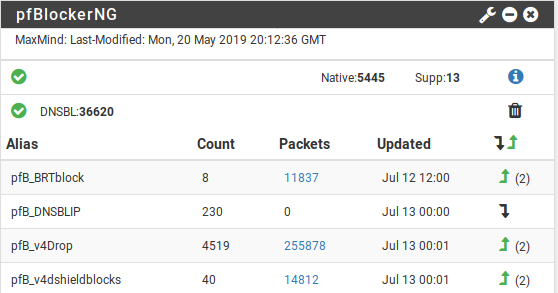
The system seems to be working well enough; the list of miscreants as small, but effectively targeted: 11,840 packets dropped from an average of about 8-10 bad IPs at any given time.
Lets encrypt with security/dehydrated (acme-client is dead)
Well…. security/acme-client is dead. That’s sad.
Long live dehydrated, which uses the same basic authentication method and is pretty much a drop in replacement (unlike scripts which use DNS authentication, say).
In figuring out the transition, I relied on the following guides:
- https://ogris.de/howtos/freebsd-dehydrated.html
- https://wiki.freebsd.org/BernardSpil/LetsEncrypt.sh
- https://erdgeist.org/posts/2017/just-add-water.html
If you’re migrating from acme-client, you can delete it (if you haven’t already)
portmaster -e acme-client
And on to installation. This guide is for libressl/apache24/bash/dehydrated. It assumes you’ve been using acme-client and set it up more or less like this.
Installation of what’s needed
if you don’t have bash installed, you will. You can also build with ZSH but set the config before installing.
cd /usr/ports/security/dehydrated && make install clean && rehash
or
portmaster security/dehydrated
This guide also uses sudo, if it isn’t installed:
cd /usr/ports/security/sudo && make install clean && rehash
or
portmaster /security/sudo
Set up directories and accounts
mkdir -p /var/dehydrated
pw groupadd -n _letsencrypt -g 443
pw useradd -n _letsencrypt -u 443 -g 443 -d /var/dehydrated -w no -s /nonexistent
chown -R _letsencrypt /var/dehydrated
If migrating from acme-client this should be done but:
mkdir -p -m 775 /usr/local/www/.well-known/acme-challenge
chgrp _letsencrypt /usr/local/www/.well-known/acme-challenge
# If migrating from acme-client
chmod 775 /usr/local/www/.well-known/acme-challenge
chown -R _letsencrypt /usr/local/www/.well-known
Configure Dehydrated
ee /usr/local/etc/dehydrated/config
add/adjust
014 DEHYDRATED_USER=_letsencrypt

017 DEHYDRATED_GROUP=_letsencrypt

044 BASEDIR=/var/dehydrated

056 WELLKNOWN="/usr/local/www/.well-known/acme-challenge"

065 OPENSSL="/usr/local/bin/openssl"

098 CONTACT_EMAIL=gessel@blackrosetech.com
save and it should run:
su -m _letsencrypt -c 'dehydrated -v'
You should get roughly the following output:
# INFO: Using main config file /usr/local/etc/dehydrated/config
Dehydrated by Lukas Schauer
https://dehydrated.io

Dehydrated version: 0.6.2
GIT-Revision: unknown

OS: FreeBSD 11.2-RELEASE-p6
Used software:
bash: 5.0.7(0)-release
curl: curl 7.65.1
awk, sed, mktemp: FreeBSD base system versions
grep: grep (GNU grep) 2.5.1-FreeBSD
diff: diff (GNU diffutils) 2.8.7
openssl: LibreSSL 2.9.2
File adjustments and scripts
by default it will read /var/dehydrated/domains.txt for the list of domains to renew
Migrating from acme-client? Reuse your domains.txt, the format is the same.
mv /usr/local/etc/acme/domains.txt /var/dehydrated/domains.txt
Create the deploy script:
ee /usr/local/etc/dehydrated/deploy.sh
The following seems to be sufficient
#!/bin/sh

/usr/local/sbin/apachectl graceful
and make executable
chmod +x /usr/local/etc/dehydrated/deploy.sh
Give the script a try:
/usr/local/etc/dehydrated/deploy.sh
This will test your apache config and that the script is properly set up.
There’s a bit of a pain in the butt in as much as the directory structure for the certs changed. My previous guide would put certs at /usr/local/etc/ssl/acme/domain.com/cert.pem, this puts them at /var/dehydrated/certs/domain.com
Check the format of your certificate references and use/adjust as needed. This worked for me – note you can set your key locations to be the same in the config file, but the private key directory structure does change between acme-client and dehydrated.
sed -i '' "s|/usr/local/etc/ssl/acme/|/var/dehydrated/certs/|" /usr/local/etc/apache24/extra/httpd-vhosts.conf
Or if using httpd-ssl.conf
sed -i '' "s|/usr/local/etc/ssl/acme/|/var/dehydrated/certs/|" /usr/local/etc/apache24/extra/httpd-ssl.conf
And privkey moves from /usr/local/etc/ssl/acme/private/domain.com/privkey.pem to /var/dehydrated/certs/domain.com/privkey.pem so….
sed -i '' "s|/var/dehydrated/certs/private/|/var/dehydrated/certs/|" /usr/local/etc/apache24/extra/httpd-vhosts.conf
# or
sed -i '' "s|/var/dehydrated/certs/private/|/var/dehydrated/certs/|" /usr/local/etc/apache24/extra/httpd-ssl.conf
Git sum certs
su -m _letsencrypt -c 'dehydrated --register --accept-terms'
Then get some certs
su -m _letsencrypt -c 'dehydrated -c'
-c is “chron” mode which is how it will be called by periodic.
and “deploy”
/usr/local/etc/dehydrated/deploy.sh
If you get any errors here, track them down.
Verify your new certs are working
cd /var/dehydrated/certs/domain.com/
openssl x509 -noout -in fullchain.pem -fingerprint -sha256
Load the page in the browser of your choice and view the certificate, which should show the SHA 256 fingerprint matching what you got above. YAY.
Automate Updates
ee /etc/periodic.conf
insert the following
weekly_dehydrated_enable="YES"
weekly_dehydrated_user="_letsencrypt"
weekly_dehydrated_deployscript="/usr/local/etc/dehydrated/deploy.sh"
weekly_dehydrated_flags="-g"
note the flag is –keep-going (-g) Keep going after encountering an error while creating/renewing multiple certificates in cron mode
Getting the postfixadmin 3.2 update to work with FreeBSD
Postfixadmin is a very nice tool for managing a mail server via a nice web interface that just went through an update to add some security and compatibility features, but at the current revision there are a few bugs (the maintainer says these will all be cleared up in the next release). A few work-arounds:
If you get:
pkg-static: Unable to access file /var/ports/usr/ports/mail/postfixadmin/work/stage/usr/local/share/postfixadmin/README.md:No such file or directory
Then run
# make config
and enable DOCS.
If you get
PHP Fatal error: Uncaught exception 'PharException' with message 'phar "/usr/local/www/postfixadmin/lib/random_compat.phar" openssl signature could not be verified: openssl not loaded' in /usr/local/www/postfixadmin/lib/random_compat.phar:8\nStack trace:\n#0 /usr/local/www/postfixadmin/lib/random_compat.phar(8): Phar::webPhar(NULL, 'index.php')\n#1 /usr/local/www/postfixadmin/common.php(72): require_once('/usr/local/www/...')\n#2 /usr/local/www/postfixadmin/public/common.php(2): require_once('/usr/local/www/...')\n#3 /usr/local/www/postfixadmin/public/setup.php(27): require_once('/usr/local/www/...')\n#4 {main}\n thrown in /usr/local/www/postfixadmin/lib/random_compat.phar on line 8
There’s a dependency that’s not built into the makefile yet.
Run
# portmaster security/php56-openssl
(adjust the PHP version to match, or the install command to suit your environment). Remember to run # apachectl restart.
Also note that the directory the code is served from has been moved to the subdirectory /public for security. This may require updating URLs, DocumentRoot, or modrewrite as appropriate to the webserver environment to get to the login page.
After updating, navigate to public/upgrade.php to update the database automatically.
And because this is open source and not some horrible closed source product, it took a whole 2 hours for a fix.
https://bugs.freebsd.org/bugzilla/show_bug.cgi?id=231424
Thanks ports.maintainer@evilphi.com!
Rubygem passenger flavors in FreeBSD
The latest bit of code to adopt the trendy new “flavors” model is passenger. As “flavors” aren’t supported in Portmaster, this means the transition results in errors like:
/bin/rmdir /var/ports/usr/ports/www/rubygem-passenger/work-apache/stage/usr/local/lib/ruby/gems/2.4/extensions 2> /dev/null || true
( cd /var/ports/usr/ports/www/rubygem-passenger/work-apache/passenger-5.1.12 &&  /bin/sh -c '(/usr/bin/find -Ed $1 $3 | /usr/bin/cpio -dumpl $2 >/dev/null 2>&1) &&  /usr/bin/find -Ed $1 $3 \(   -type d -exec /bin/sh -c '\''cd '\''$2'\'' && chmod 755 "$@"'\'' . {} +  -o -type f -exec /bin/sh -c '\''cd '\''$2'\'' && chmod 0644 "$@"'\'' . {} + \)' COPYTREE_SHARE buildout /var/ports/usr/ports/www/rubygem-passenger/work-apache/stage/usr/local/lib/ruby/gems/2.4/gems/passenger-5.1.12 )
find: buildout: No such file or directory
find: buildout: No such file or directory
You can make with flavors manually or (assuming your current version is 5.1.12, adjust as needed):
# portmaster -o www/rubygem-passenger rubygem-passenger-5.1.12
Let’s Encrypt….
Let’s encrypt, why not?
Wanna know how I did it for FreeBSD/Apache/acme-client, jump below.
Let’s encrypt is a service from the fine people at Mozilla, who, when they’re not trying to prove that Firefox can be a Chrome clone, do some really good stuff. Certificates are what give you the little warm fuzzy feeling of a green lock icon, and when properly configured, avoid giving you that terrifying feeling that something horrible is about to happen if you visit a site with an expired one or a self-signed one.
There are some huge structural problems in the certificate concept that seem to exist only to validate the certificate mafia, that can charge $100s per year for a validated certificate, as if executing the script to issue one was somehow expensive. It is not, you can generate one yourself that provides exactly the same security as one provided by a big company that gets their root certs distributed in a browser, but browsers reject these with scary messages so webmasters have to keep buying them.
Now there’s a theory behind why they’re ripping you off: the premise is that the certificate verifies the site is who it says it is – that if you go to mybank.com, you’re actually visiting your real bank, not being redirected by a man-in-the-middle attack to some fake landing page to harvest your passwords, log into your account, and steal all your cats. There are a few problems with this:
- Nobody actually checks a URL so while a certificate sort of adds some weight to the probability that mybank.com is owned by mybank, not some hacker a few tables over ARP poisoning the cafe wifi, it doesn’t do anything if you click on a link to mibank.com.
- The companies that claim to check IDs and verify owners, do not. That would cost money. You think they’re gonna actually do that? No… (CAcert actually does, but they don’t get a root cert because… they do it for free. And don’t have Mozilla’s money and clout.)
- Stealing a root cert private key can generate significant LOLZ; it happens a lot.
- Law enforcement the world over has “lawful intercept” certs. You’re probably on some country’s poop list if you have ever used social media. Their laws permit intercepting your communications. Some country’s laws somewhere certainly do no matter who you are.
- But dang, those annoying warnings that do nothing to secure you mean that people who publish a website just for the good of the planet either have to pay up, go through a lot of hassle, or leave their user’s content streams exposed to the world’s prying eyes…
…Until Let’s Encrypt came along. It is a lovely little set of tools and services that not only issue browser-accepted certs (see the green lock?) but also automate renewal. They basically check that you have enough control over your website to let a script write a file that that they can read back and verify, and if so, you’re who you say you are: the person with write access to the server powering the website they’re giving the certificate too. That’s all anyone can really do, and is as secure as any other cert there is for identification of a site: that is except for stolen certs, url typos, law enforcement certs, or malicious code on your computer, if you visit https://brt.llc/ and you don’t get any warnings, you’re probably reading data coming off my computer and not some hacker pretending to be me.
I got Let’s Encrypt to work, but it took some modifications of the existing guides, and I think the service is a good thing that more people should use, so in the spirit of investing some of my resources into the great shared experiment that is Open Source, here’s my How To:
Upstream Guides:
I found these two guides extremely helpful.
https://brnrd.eu/security/2016-12-30/acme-client.html
Step 1: Installing the certificate generation tool
There are a few different software tools to manage the Let’sEncrypt process. I elected to use Kristaps Dzonsons acme-client, ported to FreeBSD by Bernard Spil.
I was using OpenSSL on my site. Bernard and Kristaps have some strong opinions on OpenSSL and heartbleed and a few other problems and therefore require LibreSSL. If you’re using it already, great. If not, you’ll have to install it. It wasn’t too terrible, but I ran into a few issues:
https://wiki.freebsd.org/LibreSSL
Or, easy peasy https://ootput.github.io/2016/07/20/Switching-to-LibreSSL/
ee /etc/make.conf
 -> set DEFAULT_VERSIONS+= ssl=libressl
portmaster -od security/libressl security/openssl
portmaster -rd security/libressl
if that fails with
===>>> The argument to -r must be a package name, or a glob pattern
Then try:
pkg version -v | grep libre
  libressl-2.6.3 = up-to-date with index
portmaster -rd libressl-2.6.3
# or for a complete refresh
portmaster -Rafd
Curl will probably fail with LibreSSL (and with the latest, if it has brotli support enabled). Check the google to see if these fixes are still needed, or just:
# cd /usr/ports/ftp/curl
# make config
disable TLS-SRP https://forums.freebsd.org/threads/56917/
ftp/curl 7.75.0 has an issue with pied piper brotli, which requires modifying the makefile to build --without-brotli as indicated in comment #2
(Sunpoet, the curl port maintainer, got back to me with an update: when PR/223966 is integrated in Brotli, he will add an optional Brotli support flag and it should work fine at that point without the Makefile edit.)
Step 2: Actually installing acme-client
The really easy part: you should be able to
# portmaster security/acme-client
and be on your way to configuration heaven.
Step 3: Initial configuration
The defaults for acme-client expect certain directories to exist and the installer doesn’t create them.
# mkdir -pm750 /usr/local/www/.well-known && chown -R www:www /usr/local/www/.well-known
# mkdir -pm750 /usr/local/www/.well-known/acme-challenge && chown -R www:www /usr/local/www/.well-known/acme-challenge
The how-to’s seemed to forget the last one.
And make a modification to your httpd.conf file to permit the Let’s Encrypt servers to have access to these folders:
# ee /usr/local/etc/apache24/httpd.conf
add the following:
# Lets Encrypt challenge directory configured per
# https://brnrd.eu/security/2016-12-30/acme-client.html
<Directory "/usr/local/www/.well-known/">
        Options None
        AllowOverride None
        Require all granted
        Header add Content-Type text/plain
</Directory>
And, for each VHOST that is going to get a cert:
# ee /usr/local/etc/apache24/extra/httpd-vhosts.conf
add to each non-ssl VHOST definition the following:
Alias /.well-known/ /usr/local/www/.well-known/
such that you end up with something like (yours may be different, especially watch out for BasicAuth or ModRewrite, addressed further down):
<VirtualHost IP.NU.MB.ER:80>
    ServerName domain.com
    ServerAdmin admin@domain.com
    DocumentRoot /usr/local/www/data-dist/domain-root
    ServerAlias *.domain.com www.domain.com
    Alias /.well-known/ /usr/local/www/.well-known/
    ErrorLog /var/log/domain-error_log
    CustomLog /var/log/domain-access_log combined
    ScriptAlias /cgi-prg /www/cgi-prg
</VirtualHost>
Don’t forget!
# apachectl restart
Step 4: First Try
At this point the system should be configured sufficiently to do a trial run with a single domain from the command line. Later on there are some scripts that will automate the process of both converting a large number of VHOSTed domains on a server to Let’s Encrypt and for maintaining them and getting email notifications if anything goes wrong in the, hopefully, fully automatic renewal process.
acme-client -mvnNC /usr/local/www/.well-known/acme-challenge domain.com www.domain.com
This should create all the directories still needed and populate them, then check with the lets encrypt server and get a certificate and install it in the right place. Inshalla.
If you get something like
acme-client: transfer buffer: [{ "type": "urn:acme:error:malformed","detail": "Provided agreement URL[https://letsencrypt.org/documents/LE-SA-v1.1.1-August-1-2016.pdf]does not match current agreement URL[https://letsencrypt.org/documents/LE-SA-v1.2-November-15-2017.pdf]","status": 400 }] (267 bytes)
That means the lets encrypt agreement has changed. You can’t do much but write the port maintainer or wait for an update. It will get fixed quickly and should only happen once a year. I don’t think you’ll get it at all unless you’re unlucky enough to try to update when it is changing. I was.
More likely you’ll get something like
acme-client: transfer buffer: [{ "type": "http-01", "status": "invalid", "error": { "type": "urn:acme:error:unauthorized", "detail": "Invalid response from : (etc...)
This means there’s a problem accessing the /.well-known/ directory by the server. There can be a lot of reasons for this:
- You didn’t restart apache
# apachectl restart - There was an error in the config file (look at the output of the restart) and therefore apache didn’t actually reaload with your new config.
- DNS isn’t pointing where you think it is pointing. Check with
nslookup/whoisto make sure. Really. - You have the directories protected in some way – like with
.htaccess. (see below)
But if it goes well, you’ll get something like:
acme-client: /usr/local/etc/acme/domain.com/privkey.pem: account key exists (not creating)
acme-client: /usr/local/etc/ssl/acme/private/domain.com/privkey.pem: domain key exists (not creating)
acme-client: : directories
acme-client: acme-v01.api.letsencrypt.org: DNS: 173.223.13.221
acme-client: acme-v01.api.letsencrypt.org: DNS: 2001:418:142b:290::3d5
acme-client: acme-v01.api.letsencrypt.org: DNS: 2001:418:142b:28d::3d5
acme-client: : req-auth: domain.com
acme-client: /usr/local/www/.well-known/acme-challenge/_ffVe6jHNHbIG1XKAeoqQmmtryWMGCKsfHIWWkl5lJw: created
acme-client: : challenge
acme-client: : status
acme-client: : certificate
acme-client: http://cert.int-x3.letsencrypt.org/: full chain
acme-client: cert.int-x3.letsencrypt.org: DNS: 184.23.159.176
acme-client: cert.int-x3.letsencrypt.org: DNS: 184.23.159.177
acme-client: cert.int-x3.letsencrypt.org: DNS: 2001:5a8:100::b817:9fb0
acme-client: cert.int-x3.letsencrypt.org: DNS: 2001:5a8:100::b817:9fb1
acme-client: /usr/local/etc/ssl/acme/domain.com/chain.pem: created
acme-client: /usr/local/etc/ssl/acme/domain.com/cert.pem: created
Yay, you’ve got certs! Now update your vhosts file to point to the certs you just created. You may need to add a 443 container or, if it exists, update it to point to the new certs and restart apache.
# ee /usr/local/etc/apache24/extra/httpd-vhosts.conf
<VirtualHost IP.NU.MB.ER:443>
      ServerName domain.com
      ServerAdmin admin@domain.com
      DocumentRoot /usr/local/www/domainroot
      ServerAlias domain.com sub.domain.com
      SSLCertificateFile /usr/local/etc/ssl/acme/domain.com/cert.pem
      SSLCertificateKeyFile /usr/local/etc/ssl/acme/private/domain.com/privkey.pem
      SSLCertificateChainFile /usr/local/etc/ssl/acme/domain.com/fullchain.pem
      Header set Strict-Transport-Security "max-age=31536000; includeSubDomains"
      ErrorLog /var/log/domain-error_log
      CustomLog /var/log/domain-access_log combined
</VirtualHost>
save and restart, look for any errors (typos on directory paths etc. will be detected and apache won’t restart, but be aware, it won’t quit either).
# apachectl restart
 Performing sanity check on apache24 configuration:
 Syntax OK
 Stopping apache24.
 Waiting for PIDS: 81160.
 Performing sanity check on apache24 configuration:
 Syntax OK
 Starting apache24.
Navigate to https://www.domain.com/ and check out your new green lock. Check security and you should find:
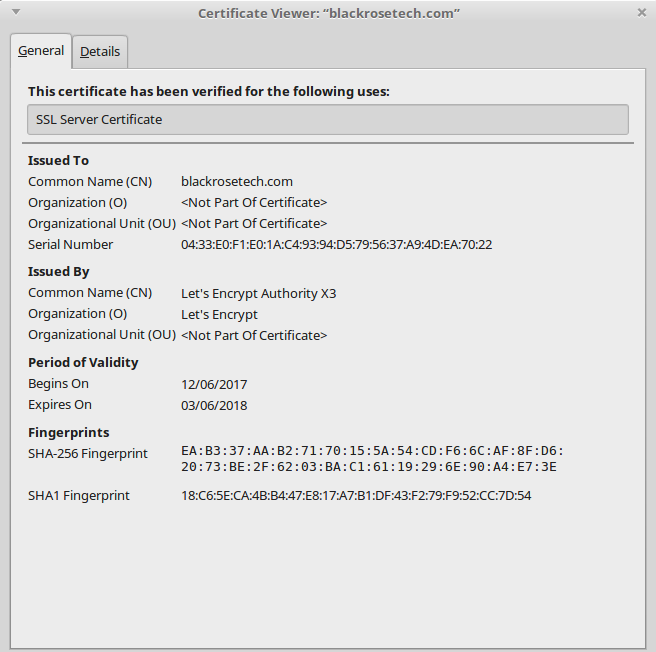
W00T!
Acme-Client Options
# man acme-client has all the deets, but we’re using:
- -m to append the domain name to paths, use this and always use it or never.
- -v for verbose output so we can see what is going on.
- -n to check if an account key exists and create if not (no reason to omit)
- -N to check if a domain key exists and create if not (also no reason to omit)
- -C to specify the path to the challenge dir. These guides all assume a centralized challenge dir outside the main serving path, and to which we redirect via an
aliasdirective. - -F which forces the recreation of certs even if they haven’t expired (this counts against your 10 per 3 hours limit)
- -s which redirects the process to the Let’s Encrypt staging server, which has no volume limits but also doesn’t create certs browsers accept. (Using this is fine, but requires cleanup to switch to the production server, see below)
- -e which is used to add a SAN to the certificate. Removing one is a bit more involved (see below).
Automating Registration
Lets say you have a lot of domains, you might want to automate the process. I modified the renewal script to automate the registration process. This saved some time, but one quirk is you can only register 10 domains (certificates, including SANs, basically 10 lines of the domains list) per 3 hours (they say-I found it takes more like 12 hours to be allowed to register more).
First create a file with all the domains you want to register for a Let’s Encrypt certificate in the same format as the renewal script uses (it can be the same file, but I made it different as I was experimenting)
# ee /usr/local/etc/acme/newdomains.txt
domain.com www.domain.com
domain2.com www.domain2.com
domain3.com www.domain3.com
(save)

# ee /usr/local/etc/acme/acme-client-bulk-add.sh
#!/bin/sh

###
#
# This script was adapted by Richard Fassett from letskencrypt.sh
# by Bernard Spil
# See https://brnrd.eu/security/2016-12-30/acme-client.html
#
# and updated again from richard fassett's script at
# https://web.archive.org/web/20180813162024/https://www.richardfassett.com/2017/01/16/using-lets-encrypt-with-acme-client-on-a-freebsd-11apache-2-4/
#
# this requires a file called /usr/local/etc/acme/newdomains.txt of the format
# domain.tld sub.domain.tld alt.domain.tld
# domain2.tld
# domaind3.tld sub.domain3.tld
# etc
#
# This should only be run to bulk-add domains.
###

# Define location of dirs and files
DOMAINSFILE="/usr/local/etc/acme/newdomains.txt"
CHALLENGEDIR="/usr/local/www/.well-known/acme-challenge"

# Loop through the newdomains.txt file with lines like
# example.org www.example.org img.example.org
cat ${DOMAINSFILE} | while read domain subdomains ; do

  # Create the cert directory with the command
  # acme-client -mvnNC /usr/local/www/.well-known/acme-challenge (domain subdomains)

  acme-client -mvnN -C "${CHALLENGEDIR}" ${domain} ${subdomains}

done

# chmod +x /usr/local/etc/acme/acme-client-bulk-add.sh
A few fixes/recoveries that might be useful at this point: add SAN, remove SAN, switch from staging to production Let’s Encrypt servers.
Automation can break things, you might find you adjusted a few domains incorrectly or want to add a SAN later.
If you need to redo a domain from scratch, for example if you use the “s” option which created a cert from the staging server that doesn’t have volume limits (maybe you’re testing a lot of domains or trying to debug a particularly tricky .htaccess or DNS condition) – you might create a domain with acme-client -mvnsNC /usr/local/www/.well-known/acme-challenge domain.com www.domain.com and then want to generate the production cert. You also need to do this to remove a SAN. If you try without deleting the directories, you’ll get something like unknown SAN entry. (You replace “domain.com” with your domain.)
# setenv DD domain.com
# rm -r /usr/local/etc/ssl/acme/private/$DD && rm -r /usr/local/etc/acme/$DD && rm -r /usr/local/etc/ssl/acme/$DD && acme-client -mvnFNC /usr/local/www/.well-known/acme-challenge $DD www.$DD
If you need to add a new SAN to an existing domain
acme-client -mvneFNC /usr/local/www/.well-known/acme-challenge domain.com www.domain.com newsub.domain.com
it is the -e that “extends” the certificate.
Step 5: Automating Renewal
You might notice that the duration of the certificate is rather short: 3 months. You really don’t want to be responding to certificate expired errors every 3 months, so let’s automate the renewal process. For this you can create two files and store them on your server. One is the renewal script itself and the other is a list of domains to renew. This assumes you have more than one domain. If you only have one domain, this is a bit overkill, but it will work, so why not? You might get more domains in the future. Everyone does.
First create a file with your list of domains, call it something creative like “domains.txt” This is really a certificate request list with the “primary” domain and Subject Alternative Names (SANs) each on a single line. In theory the SANs can be all over the place and Let’s Encrypt allows up to 100 per certificate (quite a lot), so the implication of “domains.txt” naming is a bit inaccurate, but that’s what everyone is using so we won’t be contrary. You have to make sure that all the subdomains resolve—the Let’s Encrypt servers are going to look them up via DNS and if there aren’t working entries, this will fail with one of the errors above. Check first. I have not tested whether, if for example, you own domain.com, domain.org, and domain.net and they all point to the same directory, you can use one cert with different TLDs (or domains) as SANs; you should be able to, but I didn’t try.
# ee /usr/local/etc/acme/domains.txt

domain.com www.domain.com sub.domain.com sub2.domain.com
domain.org www.domain.org
domain2.com www.domain2.com cats.domain2.com kittens.domain2.com
Now that you’ve saved that, the following script is adapted from a few at the references listed above and works on my server. I made a few adjustments and corrections (there was a name change for acme-client which hasn’t quite propagated through all the HowTos yet).
# ee /usr/local/etc/acme/acme-client-update.sh
#!/bin/sh

###
#
# This script was adapted from letskencrypt.sh by Bernard Spil
# See https://brnrd.eu/security/2016-12-30/acme-client.html
# ... and further modified by David Gessel
# This script will fail if the directories haven't been set up and
# domains in domain.txt have been successfully verified
#
###

# Define location of dirs and files
DOMAINSFILE="/usr/local/etc/acme/domains.txt"
CHALLENGEDIR="/usr/local/www/.well-known/acme-challenge"

# is changed to 1 if any domains expired and were renewed
CHECKEXPIRATION=0

# Loop through the domains.txt file with lines like
# example.org www.example.org img.example.org
cat ${DOMAINSFILE} | while read domain subdomains ; do

    # acme-client returns RC=2 when certificates
    # weren't changed; use set +e to capture the return code
    set +e
    # Renew the key and certs if required
    acme-client -mvb -C "${CHALLENGEDIR}" ${domain} ${subdomains}
	RC=$?

   # now that we have the return code, set script to exit if
   # nonzero is returned
   set -e

   # if anything is expired, we'll want to do something
   # (e.g., restart HTTPS)
   if [ $RC -ne 2 ] ; then
        CHECKEXPIRATION=1
   fi
done

if [ "$CHECKEXPIRATION" -ne "0" ] ; then
        service apache24 restart
fi

# chmod +x /usr/local/etc/acme/acme-client-update.sh
This works quite well and will walk through your domains and renew as needed.
I have 36 domain/certificate lines in my “domains.txt” file and timing this script it takes 2.13 seconds to execute on my server. There’s no real problem running it every night and if you have a lot of domains, you should remember you can only get 10 certs at a time and they won’t renew for about a week before expiry, a limitation I ran into in the bulk setup process. You can spread your domain renewals out over the three months by force renewing blocks of them if you have more than about 60 per server.
You probably want to automate the process as a cron job. But before we do, lets address one more little problem: one of the shortcomings of the script process below is that the output messages of the script are output to stdout and only cron’s stderr is emailed to the admin. If your shell environment is wrong or the path to the script is wrong, cron will tell you, but if your domains don’t resolve or the script can’t reach /.well-known/, you will not get any warnings. That’s might be a bummer. So I redirect the output of the client-update.sh script to a log file. It gets overwritten with each execution, so it doesn’t need to be rotated – it is just the output of the last execution. It should be filled with lines including “adding SAN” (which it tells you for each domain) and “certificate valid” which it tells you for each cert that doesn’t need to be renewed. But it might tell you something else, like it barfed trying to reach the /.well-known/ directory because, say, you messed around with .htaccess or forgot to renew your domain and it is being redirected to parking or something. The following script first checks to see if there are any lines in /var/log/lets-encrypt-renew other than the expected, and if so, emails just those lines. You shouldn’t get anything until renewal time or if there’s an error. If you don’t care about renewal notices, you can edit the script to ignore those too.
# ee /usr/local/etc/acme/acme-client-errors.sh
#!/bin/sh

###
# this script scans the log file created by the renewal execution cron job
# then removes any lines containing "adding SAN" or "certificate valid", which
# are normal messages, and mails whatever is left over using the "mail" command
# check full paths (or use relative) but full paths can avoid some errors
# use "# which grep" and "# which mail" on your system to check.

PROBLEM=0

/usr/bin/grep -v "adding SAN" /var/log/lets-encrypt-renew | \
/usr/bin/grep -v "certificate valid" | /usr/bin/cat | \
{ while read status
  do
       PROBLEM=1
  done

  if [ "$PROBLEM" -ne "0" ] ; then
        /usr/bin/grep -v "adding SAN" /var/log/lets-encrypt-renew | \
        /usr/bin/grep -v "certificate valid" | \
        /usr/bin/mail -s "Lets Encrypt Errors" gessel@blackrosetech.com $1
  fi
}

# chmod +x /usr/local/etc/acme/acme-client-errors.sh
My cron configuration is set up as
# crontab -e

#*     *     *   *    *        command to be executed
#-     -     -   -    -
#|     |     |   |    |
#|     |     |   |    +----- day of week (0 - 6) (Sunday=0)
#|     |     |   +------- month (1 - 12)
#|     |     +--------- day of        month (1 - 31)
#|     +----------- hour (0 - 23)
#+------------- min (0 - 59)

MAILTO=gessel
# expanded path
PATH=/sbin:/bin:/usr/sbin:/usr/bin:/usr/games:/usr/local/sbin:/usr/local/bin
SHELL=/bin/csh
# Let's Encrypt renewal check
*       3       *       *       *        /usr/local/etc/acme/acme-client-update.sh > & /var/log/lets-encrypt-renew
*       4       *       *       *        /usr/local/etc/acme/acme-client-errors.sh
Note that this requires that mail works. On servers that aren’t serving email, I use SSMTP and configured it more or less following this guide https://www.freebsd.org/doc/handbook/outgoing-only.html and https://www.davd.eu/freebsd-send-mails-over-an-external-smtp-server/ and this https://www.debarbora.com/freebsd-10-1-setup-ssmtp-for-outgoing-mail/ especially the tip about using # chpass to change the default Full Name for root from “Charlie &” to something useful like “ServerName Root.”
You can test the mail function by adding a random word (or domain) to your domains.txt file and then executing
# /usr/local/etc/acme/acme-client-update.sh > & /var/log/lets-encrypt-renew
# /usr/local/etc/acme/acme-client-errors.sh
If everything is set up right, you’ll get an email complaining about your random word not being valid. If you restore the correct domains.txt file and execute the above two commands you should not get an email at all.
# more /var/log/lets-encrypt-renew
should show only lines with “adding SAN” and “certificate valid” in them. If you execute # /usr/local/etc/acme/acme-client-errors.sh you shouldn’t get any message.
.htaccess Problems
If you’re controlling access to a directory or have some non-HTML style process listening, you might run into challenges giving the Let’s Encrypt server access to the /.well-known/ directory. I found the following formulation worked:
AuthType Basic
     AuthName "Please login."
     AuthUserFile "/xxx/.htpasswd"
     # the directive below also "requires" that the requested URL include /.well-known/
        Require expr %{REQUEST_URI} =~ m#^/.well-known/.*#
        Require valid-user
Basically the script above allows (requires) a “valid-user” (one with an entry in the AuthUserFile and valid matching password) and also requires (allows) a URL that is going to /.well-known/ and subdirectories thereof. This also works in /usr/local/etc/apache24/httpd.conf and /usr/local/etc/apache24/extra/httpd-vhosts.conf
modRewrite to HTTPS problems
You can also create problems by rewriting to HTTPS. You might want to do this now that you have certs that will auto-renew and you can provide a secure experience for everyone. In order to get to the /.well-known/ directory, you have to add an exception to the mod-write rule for traffic to this subdirectory like so:
	RewriteEngine on
           RewriteCond %{REQUEST_URI} !^/\.well\-known/acme\-challenge/
	RewriteCond %{HTTPS} off
            RewriteRule (.*) https://%{SERVER_NAME}/$1 [R=301,L]
Also, if you redirect on a 404, some formulations cause problems. This one does not seem to:
ErrorDocument 404 /index.php
oniguruma5 vulnerabilities and php56-mbstring
If you’ve had a FreeBSD system up for a while, you might have installed converters/php56-mbstring. It might have originally been installed with devel/oniguruma5, which is unmaintained and has some serious vulnerabilities. If you install it new, it will install devel/oniguruma6 as a dependency and that’s fine. If you’re stuck with the old version:
# pkg audit -F
# portmaster -e oniguruma5-5.9.6_1  (your exact version may vary)
# cd /usr/ports/devel/oniguruma5
# make deinstall
# make clean
# portmaster php56-mbstring-5.6.31 (your exact version may vary)
# pkg audit -F
Vulns erased. I didn’t find anything about this in /usr/ports/UPDATING so, if you’re searching, here it is.
Vulns:
oniguruma5-5.9.6_1 is vulnerable:
oniguruma — multiple vulnerabilities
CVE: CVE-2017-9228
CVE: CVE-2017-9228
CVE: CVE-2017-9227
CVE: CVE-2017-9226
CVE: CVE-2017-9224
WWW: https://vuxml.FreeBSD.org/freebsd/b396cf6c-62e6-11e7-9def-b499baebfeaf.html