Linux
Posts about the Linux operating system.
A one page home/new tab page with random pictures, time, and weather
Are you annoyed by a trend in browsers to default to an annoying advertising page with new tabs? I sure am. And they don’t make it easy to change that. I thought, rather than a blank new tab page, why not load something cute and local. I enlisted claude.ai to help expedite the code and got something I like.
homepage.html is a very simple default page that loads a random image from a folder as a background, overlays the current local time in the one correct time format with seconds, live update, and throws up the local weather from wttr.in after a delay (to avoid hitting the server unnecessarily if you’re not going to keep the tab blank long enough to see the weather).
Images have to be in a local folder and in a predictable naming structure, as written “image_001.webp” to “image_999.webp.” If the random enumerator chooses an image name that doesn’t exist, you get a blank page.
Browsers don’t auto-rotate by exif (or webp) metadata, so orient all images in the folder as you’d like them to appear.
The weather information is only “current” which isn’t all that useful to me, I’d like tomorrows weather, but that’s not quite possible with the one-liner format yet.
How you set the homepage and new tab default page varies by browser. In Brave try hamburger->appearance->show home button->select option->paste the location of the homepage.html file, e.g. file://home/gessel/homepage.html.
The pictures are up to you, but here’s the code:
<!DOCTYPE html>
<html>
<head>
  <meta charset="UTF-8">
  <title>New Tab</title>
  <style>
    body {
      margin: 0;
      padding: 0;
      height: 100vh;
      display: flex;
      justify-content: center;
      align-items: flex-start;
      overflow: hidden;
    }

    #background-image {
      position: fixed;
      top: 0;
      left: 0;
      width: 100%;
      height: 100%;
      background-size: cover;
      background-position: center;
      z-index: -1;
    }

    #time-date {
      position: absolute;
      top: 20px;
      right: 20px;
      font-size: 48px;
      color: white;
      text-shadow: 3px 3px 8px rgba(0, 0, 0, 1);
      font-family: sans-serif;
      font-weight: bold;
    }

    #weather {
      position: absolute;
      bottom: 20px;
      left: 20px;
      font-size: 24px;
      color: white;
      text-shadow: 3px 3px 8px rgba(0, 0, 0, 1);
      font-family: sans-serif;
    }
  </style>
</head>
<body>
  <div id="background-image"></div>
  <div id="time-date"></div>
  <div id="weather"></div>

  <script>
    // Function to get a random image from the 'image_001.webp' to 'image_230.webp' range
    // Edit image folder to match the folder you want to store the images in
    // edit the min and max image index range to match the images
    // set the imageName extension to suit (e.g. .jpg, .webp, .png)
    // white screen usually means the images or folder can't be found
    function getRandomImage() {
      const imageFolder = '.images/';
      const minImageIndex = 1;
      const maxImageIndex = 230;
      const randomIndex = Math.floor(Math.random() * (maxImageIndex - minImageIndex + 1)) + minImageIndex;
      const imageName = `image_${randomIndex.toString().padStart(3, '0')}.webp`;
      return `${imageFolder}${imageName}`;
    }

    // Function to update the time and date display
    // Updates every second, uses the only technically correct* date and time format
    // * The best kind of correct.
    function updateTimeDate() {
      const dateTimeElement = document.getElementById('time-date');
      const currentDate = new Date();
      const year = currentDate.getFullYear();
      const month = String(currentDate.getMonth() + 1).padStart(2, '0');
      const day = String(currentDate.getDate()).padStart(2, '0');
      const hours = String(currentDate.getHours()).padStart(2, '0');
      const minutes = String(currentDate.getMinutes()).padStart(2, '0');
      const seconds = String(currentDate.getSeconds()).padStart(2, '0');
      const formattedDateTime = `${year}-${month}-${day} ${hours}:${minutes}:${seconds}`;
      dateTimeElement.textContent = formattedDateTime;
    }

    // Function to fetch and display the weather information
    // The delay is set for 10 seconds to avoid hitting the wttr.in server if you're just
    // opening a tab to enter a web address.  Hopefully one-line forcasts will be implemented
    // soon - check https://github.com/chubin/wttr.in/issues/447 for progress
    async function updateWeather() {
      const weatherElement = document.getElementById('weather');
      try {
        await new Promise(resolve => setTimeout(resolve, 10000)); // 10-second delay
        const response = await fetch('https://wttr.in/?m&format=%l%20%c+%C+%t%20+%h%20+%w\n');
        const weatherData = await response.text();
        weatherElement.textContent = weatherData;
      } catch (error) {
        console.error('Error fetching weather information:', error);
        weatherElement.textContent = 'Error fetching weather information.';
      }
    }

    // Set the random background image
    const backgroundImage = document.getElementById('background-image');
    backgroundImage.style.backgroundImage = `url('${getRandomImage()}')`;

    // Update the time and date every second
    setInterval(updateTimeDate, 1000);

    // Update the weather information every 100 minutes
    updateWeather();
    setInterval(updateWeather, 6000000);

    // thanks to claude.ai for helping with the scripts.
  </script>
</body>
</html>
Audio File Analysis With Sox
Sox is a cool program, a “Swiss Army knife of sound processing,” and a useful tool for checking audio files that belongs in anyone’s audio processing workflow. I thought it might be useful for detecting improperly encoded audio files or those files that have decayed due to bit rot or cosmic rays or other acoustic calamities and it is.
Sox has two statistical output command line options, “stat” and “stats,” which output different but useful data. What’s useful about sox for this, that some metadata checking programs (like the very useful MP3Diags-unstable) don’t do is actually decode the file and compute stats from the actual audio data. This takes some time, about 0.7 sec for a typical (5 min) audio file. This may seem fast, it is certainly way faster than real time, but if you want to process 22,000 files, it will take 4-5 hours.
Some of the specific values that are calculated seem to mean something obvious, like “Flat factor” is related to the maximum number of identical samples in a row – which would make the waveform “flat.” But the computation isn’t linear and there is a maximum value (>30 is a bad sign, usually).
So I wrote a little program to parse out the results and generate a csv file of all of the results in tabular form for analysis in LibreOffice Calc. I focused on a few variables I thought might be indicative of problems, rather than all of them:
- DC offset—which you’d hope was always close to zero.
- Min-Max level difference—min and max should be close to symmetric and usually are, but not always.
- RMS pk dB—which is normally set for -3 or -6 dB, but shouldn’t peak at nearly silent, -35 dB.
- Flat factor—which is most often 0, but frequently not.
- Pk count—the number of samples at peak, which is most often 2
- Length s—the length of the file in seconds, which might indicate a play problem
After processing 22,000 files, I gathered some statistics on what is “normal” (ish, for this set of files), which may be of some use in interpreting sox results. The source code for my little bash script is at the bottom of the post.
DC Bias
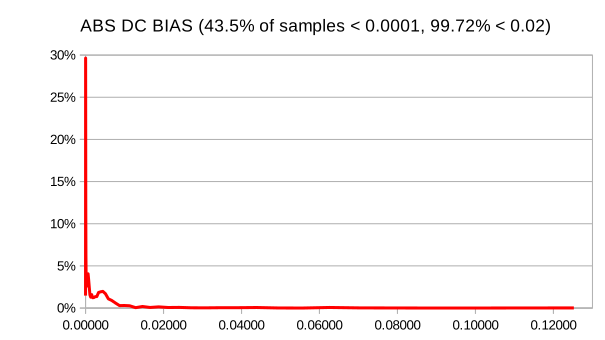
DC Bias really should be very close to zero, and the most files are fairly close to zero, but some in the sample had a bias of greater than 0.1, which even so has no perceptible audio impact.
Min Level – Max Level
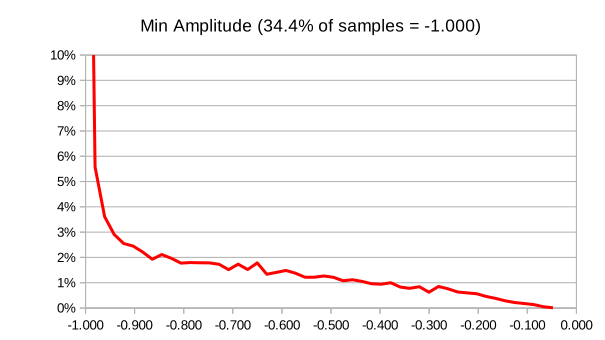
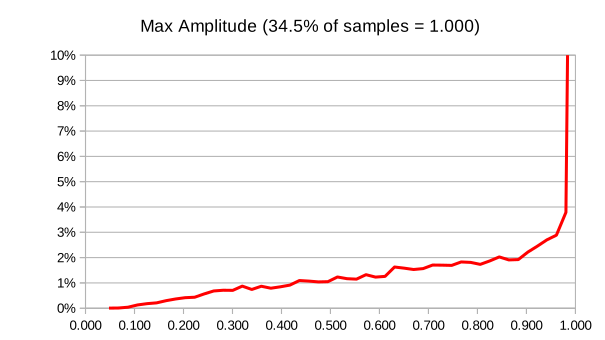
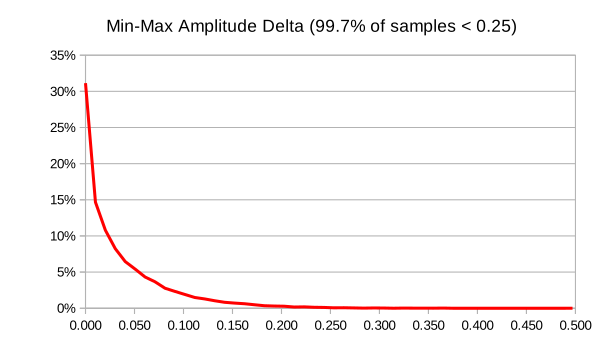
Min level is most often normalized to -1 and max level most often normalized to +1, which would yield a difference of 2 or a difference of absolute values of 0 (as measured) and this is the most common result (31.13%). A few files, 0.05% or so have a difference greater than 0.34, which is likely to be a problem and is worth a listen.
RMS pk dB
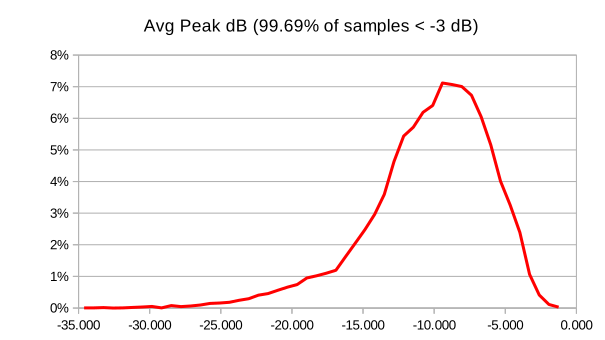
Peak dB is a pretty important parameter to optimize as an audio engineer and common settings are -6dB and -3dB for various types of music, however if a set of files is set as a group, individual files can be quite a bit lower or, sometimes, a bit higher. Some types of music, psychobilly for example, might be set even a little over -3 dB. A file much above -3 dB might have sound quality problems or might be corrupted to be just noise; 0.05% of files have a peak dB over -2.2 dB. A file with peak amplitudes much below -30 dB may be silent and certainly will be malto pianissimo; 0.05% of files have a peak dB below -31.2 dB.
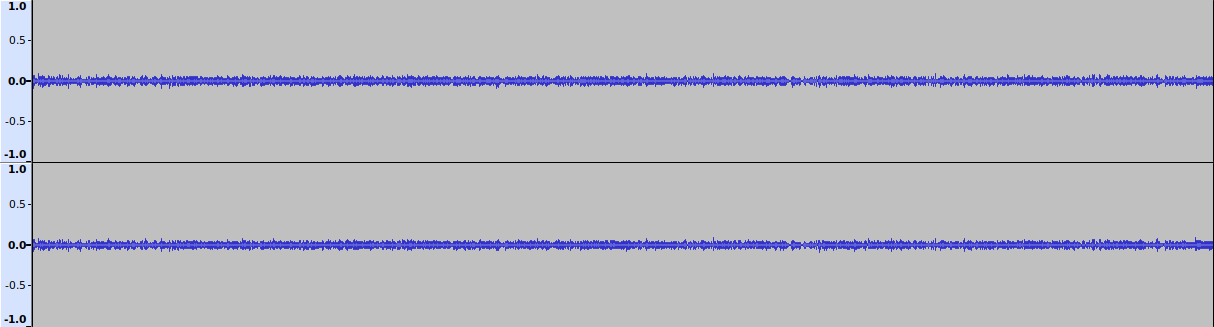
A very quiet sample, with a Pk dB of -31.58, would likely have a lot of aliasing due to the entire program using only about 10% of the total head room.
Flat factor
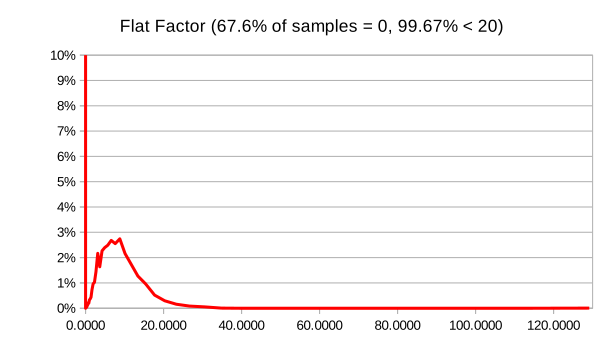
Flat factor is a complicated measure, but is roughly (but not exactly) the maximum number of consecutive identical samples. @AkselA offered a useful oneliner (sox -n -p synth 10 square 1 norm -3 | sox - -n stats) to verify that it is not, exactly, just a run of identical values and just what it actually is, isn’t that well documented. Whatever it is exactly, 0 is the right answer and 68% of files get it right. Only 0.05% of files have a flat factor greater than 27.
Pk count
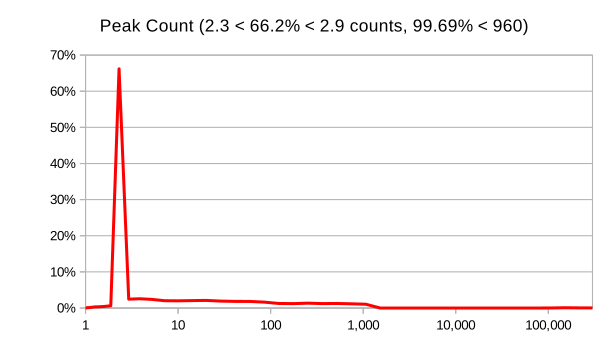
Peak count is a good way to measure clipping. 0.05% of files have a pk count < 1000, but the most common value, 65.5%, is 2, meaning most files are normalized to peak at 100%… exactly twice (log scale chart, the peak is at 2).
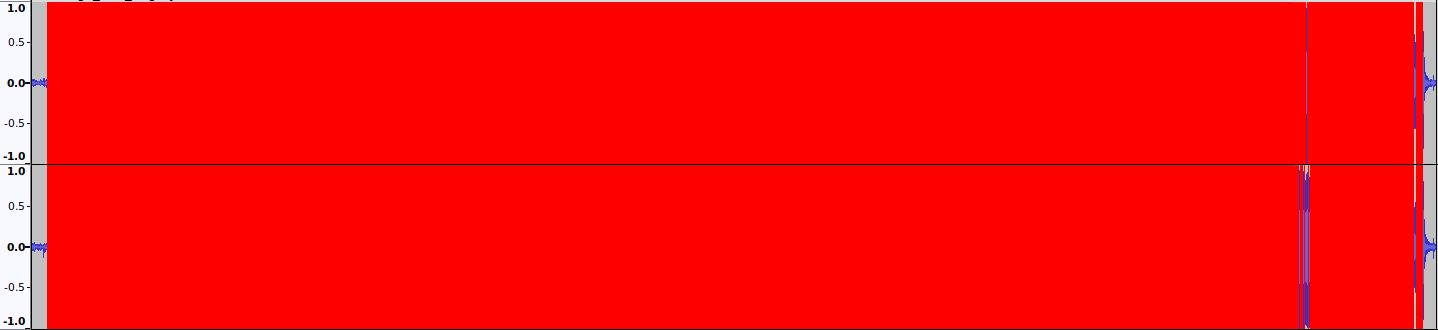
As an example, a file with levels set to -2.31 and a flat factor of only 14.31 but with a Pk count of 306,000 looks like this in Audacity with “Show Clipping” on, and yet sounds kinda like you’d think it is supposed to. Go figure.
Statistics
What’s life without statistics, sample pop: 22,096 files. 205 minutes run time or 0.56 seconds per file.
| Stats | DC bias | min amp | max amp | min-max | avg pk dB | flat factor | pk count | length s |
| Mode | 0.000015 | -1 | 1 | 0 | -10.05 | 0.00 | 2 | 160 |
| Count at Mode | 473 | 7,604 | 7,630 | 6,879 | 39 | 14,940 | 14,472 | 14 |
| % at mode | 2.14% | 34.41% | 34.53% | 31.13% | 0.18% | 67.61% | 65.50% | 0.06% |
| Average | 0.00105 | -0.80 | 0.80 | 0.03 | -10.70 | 2.03 | 288.51 | 226.61 |
| Min | 0 | -1 | 0.0480 | 0 | -34.61 | 0 | 1 | 4.44 |
| Max | 0.12523 | -0.0478 | 1 | 0.497 | -1.25 | 129.15 | 306,000 | 7,176 |
| Threshold | 0.1 | -0.085 | 0.085 | 0.25 | -2.2 | 27 | 1,000 | 1,200 |
| Count @ Thld | 3 | 11 | 10 | 68 | 12 | 12 | 35 | 45 |
| % @ Thld | 0.01% | 0.05% | 0.05% | 0.31% | 0.05% | 0.05% | 0.16% | 0.20% |
Bash Script
#!/bin/bash

###############################################################
# This program uses sox to analyize an audio file for some
# common indicators that the actual file data may have issues
# such as corruption or have been badly prepared or modified
# It takes a file path as an input and outputs to stdio the results
# of tests if that file exceeds the theshold values set below
# or, if the last conditional is commented out, all files.
# a typical invocation might be something like:
# find . -depth -type f -name "*.mp3" -exec soxverify.sh {} > stats.csv \;
# The code does not handle single or multi-track files and will
# throw an error. If sox can't read the file it will throw an error
# to the csv file. Flagged files probably warrant a sound check.

##############################################
### Set reasonable threshold values ##########
# DC offset should be close to zero, but is almost never exactly
# The program uses the absolute value of DC offset (which can be
# neg or positive) as a test and is normalized to 1.0
# If the value is high, total fidelity might be improved by
# using audacity to remove the bias and recompressing.
# files that exceed the dc_offset_bias will be output with
# Error Code "O"
dc_offset_threshold=0.1

# Most files have fairly symmetric min_level and max_level
# values.  If the min and max aren't symmetric, there may
# be something wrong, so we compute and test. 99.95% of files have
# a delta below 0.34, files with a min_max_delta above
# min_max_delta_threshold will be flagged EC "D"
min_max_delta_threshold=0.34

# Average peak dB is a standard target for normalization and
# replay gain is common used to adjust files or albums that weren't
# normalized to hit that value. 99.95% of files have a
# RMS_pk_dB of < -2.2, higher than that is weird, check the sound.
# Exceeding this threshold generates EC "H"
RMS_pk_dB_threshold=-2.2

# Extremely quiet files might also be indicative of a problem
# though some are simply malto pianissimo. 99.95% of files have
# a minimum RMS_pk_dB > -31.2 . Files with a RMS pk dB <
# RMS_min_dB_threshold will be flagged with EC "Q"
RMS_min_dB_threshold=-31.2

# Flat_factor is a not-linear measure of sequential samples at the
# same level. 68% of files have a flat factor of 0, but this could
# be intentional for a track with moments of absolute silence
# 99.95% of files have a flat factor < 27. Exceeding this threshold
# generates EC "F"
flat_factor_threshold=27

# peak_count is the number of samples at maximum volume and any value > 2
# is a strong indicator of clipping. 65% of files are mixed so that 2 samples
# peak at max. However, a lot of "loud" music is engineered to clip
# 8% of files have >100 "clipped" samples and 0.16% > 10,000 samples
# In the data set, 0.16% > 1000 samples. Exceeding this threshold
# generates EC "C"
pk_count_threshold=1000

# Zero length (in seconds) or extremely long files may be, depending on
# one's data set, indicative of some error. A file that plays back
# in less time than length_s_threshold will generate EC "S"
# file playing back longer than length_l_threshold: EC "L"
length_s_threshold=4
length_l_threshold=1200


# Check if a file path is provided as an argument
if [ "$#" -ne 1 ]; then
    echo "Usage: $0 <audio_file_path>"
    exit 1
fi

audio_file="$1"

# Check if the file exists
if [ ! -f "$audio_file" ]; then
    echo "Error: File not found - $audio_file"
    exit 1
fi

# Run sox with -stats option, remove newlines, and capture the output
sox_stats=$(sox "$audio_file" --replay-gain off -n stats 2>&1 | tr '\n' ' ' )

# clean up the output
sox_stats=$(  sed 's/[ ]\+/ /g' <<< $sox_stats )
sox_stats=$(  sed 's/^ //g' <<< $sox_stats )


# Check if the output contains "Overall" as a substring
if [[ ! "$sox_stats" =~ Overall ]]; then
    echo "Error: Unexpected output from sox: $1"
    echo "$sox_stats"
    echo ""
    exit 1
fi


# Extract and set variables
dc_offset=$(echo "$sox_stats" | cut -d ' ' -f 6)
min_level=$(echo "$sox_stats" | cut -d ' ' -f 11)
max_level=$(echo "$sox_stats" | cut -d ' ' -f 16)
RMS_pk_dB=$(echo "$sox_stats" | cut -d ' ' -f 34)
flat_factor=$(echo "$sox_stats" | cut -d ' ' -f 50)
pk_count=$(echo "$sox_stats" | cut -d ' ' -f 55)
length_s=$(echo "$sox_stats" | cut -d ' ' -f 67)

# convert DC offset to absolute value
dc_offset=$(echo "$dc_offset" | tr -d '-')

# convert min and max_level to absolute values:
abs_min_lev=$(echo "$min_level" | tr -d '-')
abs_max_lev=$(echo "$max_level" | tr -d '-')

# compute delta and convert to abs value
min_max_delta_int=$(echo "abs_max_lev - abs_min_lev" | bc -l)
min_max_delta=$(echo "$min_max_delta_int" | tr -d '-')

# parss pkcount
pk_count=$(  sed 's/k/000/' <<< $pk_count )
pk_count=$(  sed 's/M/000000/' <<< $pk_count )


# Compare values against thresholds
threshold_failed=false
err_code="ERR: "

# Offset bad check
if (( $(echo "$dc_offset > $dc_offset_threshold" | bc -l) )); then
    threshold_failed=true
    err_code+="O"
fi

# Large delta check
if (( $(echo "$min_max_delta >= $min_max_delta_threshold" | bc -l) )); then
    threshold_failed=true
    err_code+="D"
fi

# Mix set too high check
if (( $(echo "$RMS_pk_dB > $RMS_pk_dB_threshold" | bc -l) )); then
    threshold_failed=true
    err_code+="H"
fi

# Very quiet file check
if (( $(echo "$RMS_pk_dB < $RMS_min_dB_threshold" | bc -l) )); then
    threshold_failed=true
    err_code+="Q"
fi

# Flat factor check
if (( $(echo "$flat_factor > $flat_factor_threshold" | bc -l) )); then
    threshold_failed=true
    err_code+="F"
fi

# Clipping check - peak is max and many samples are at peak
if (( $(echo "$max_level >= 1" | bc -l) )); then
    if (( $(echo "$pk_count > $pk_count_threshold" | bc -l) )); then
        threshold_failed=true
        err_code+="C"
    fi
fi

# Short file check
if (( $(echo "$length_s < $length_s_threshold" | bc -l) )); then
    threshold_failed=true
    err_code+="S"
fi

# Long file check
if (( $(echo "$length_s > $length_l_threshold" | bc -l) )); then
    threshold_failed=true
    err_code+="L"
fi

# for data collection purposes, comment out the conditional and the values
# for all found files will be output.
if [ "$threshold_failed" = true ]; then
    echo -e "$1" "\t" "$err_code" "\t" "$dc_offset" "\t" "$min_level" "\t" "$max_level" "\t" "$min_max_delta" "\t" "$RMS_pk_dB" "\t" "$flat_factor" "\t" "$pk_count" "\t" "$length_s"
fi
Manually Update Time Zone Data on Android 10
One of the updates that stops when your carrier decides you have to buy a new phone to keep their profits up is the time zone data, which means as regions decide they will or won’t continue using standard time and will switch permanently to lazy people time (or not), time zone calculations start to fail, which can be awfully annoying when it causes you to miss flights or meetings. It is probably something you’ll want to keep up to date. Unfortunately, this requires root access to your phone because… profits depend on the velocity by which first world money is converted to e-waste to poison third world children. Yay.
Root requires reflashing your device, which means wiping all your data and apps and reinstalling them, so easier to do on a new phone than backing up and restoring and re-configuring all your apps. Sooner or later your vendor will stop supporting your device in an attempt to get you to throw it away and buy a new one and you’ll have to root it to keep it up to date and secure so you might as well do it now, void their stupid warranty, and take control of your device.
You should also take a moment to write your elected representatives and demand that they take civil action against this crap. Lets take a short rant break, shall we?
Planned obsolescence, death by security flaws, and vendor locks should be prosecuted, not just as illegal profiteering but as environmental crimes for needlessly flooding the world with e-waste. If you own a device you have the right to use it as you like and any entity that by omission or obfuscation of reasonable information needed to keep that device operational is depriving legitimate owners of rightful value. Willfully obstructing security updates, knowing full well the risks implied, is coercive if not extortion. Actively blocking the provision of third party services intended to mitigate these harms through barratry and legal extortion should be prosecuted aggressively. Everyone who has purchased a phone that has been intentionally and unfairly life-limited by non-replaceable batteries, intimidation of repair services, manipulation of the spare parts market, or restrictions or obfuscation of security updates is due refund of the value thus denied plus penalties.
Ah, that feels better, no?
Assuming you have a rooted phone, adb installed on your computer, and your TZ data is out of date, lets get it fixed, shall we? The problem is that TZ data comes from IANA, from here actually, and is versioned in a form like 2023c, the current as of now. That’s lovely but the format they provide is not compatible with android and needs to be transformed. Google seems to have some tools for this in the FOSS branch of Android, but it seems a little useless without a virtual environment, a PITA. But the good folks at LineageOS (yay, FOSS!!!) maintain their version of the tool with the thus created output data in their git, which we can use for all android devices (it seems). The files we need are in this directory: note that these are 2023a, but 2023c is identical to 2023a, reverting some changes made in 2023b because, I don’t know, the whole mess about getting up an hour earlier or later being some traumatic experience when it happens twice a year is catastrophic for people’s sense of well being, but when they get up at different times on days off than on work days, that doesn’t count or something. OMG. so drama. people. sometimes it hurts to be associated with them as a species. Not that I care, but stop messing around and just pick one. So many rant triggers in this whole mess.
Anyway, proceeding with the assumption your device is rooted and you have adb installed on your computer, the files needed are:
tzdata        a binary file that if you view with a text editor should start with: tzdata2023a
tzlookup.xml  an xml file that should (nearly) start with: <timezones ianaversion="2023a">
tz_version    a simple text file that should have one line: 003.001|2023a|001
Download the compressed .tgz archive of the output_data directory from here by clicking on the [tgz] text at the top right
You should get a .tgz archive, from which you want to extract:
tzlookup.xmlfrom theandroidfoldertzdatafrom theianafoldertz_versionfrom theversionfolder
Here’s the tricky bit, you gotta get these files to the right places. So I mounted my android on my computer and created a folder TZData in Downloads and copied the files there, this resolved to /data/media/0/Download/TZdata/ on my device. While you’re there, make a folder like oldTZ in the same place for backup. Everything else is done by command line via adb.
(comments are demarked with "#", the prompt is assumed)
# get shell on your device
adb shell
# get root, if this fails, you don't have root, bummer, you don't really own your device.
su root
# verify your tz data is where mine was, if so copypasta should be safe.
find / -name tzdata 2>/dev/null
#output for me looks like some are symlinks
/apex/com.android.tzdata/etc/tz/tzdata
/apex/com.android.tzdata@290000000/etc/tz/tzdata
/apex/com.android.runtime/etc/tz/tzdata
/apex/com.android.runtime@1/etc/tz/tzdata
/system/apex/com.android.runtime.release/etc/tz/tzdata
/system/apex/com.android.tzdata/etc/tz/tzdata
/system/usr/share/zoneinfo/tzdata
# did ya get the same or close enough to figure out what to do next? good.
# Backup your old stuff
cp /system/apex/com.android.tzdata/etc/tz/* /data/media/0/Download/oldTZ
# your directories are read only, so you need to fix that, scary but reversible
mount -o rw,remount /
mount -o rw,remount /apex/com.android.tzdata
mount -o rw,remount /apex/com.android.runtime
# copy the new files over the old files, the last location is legacy and doesn't
# seem to have a copy of tzlookup.xml, so we don't put a new one there, but check
ls /system/usr/share/zoneinfo
# only tzdata and tz_version?  Good.
cp /data/media/0/Download/TZdata/* /apex/com.android.tzdata/etc/tz
cp /data/media/0/Download/TZdata/* /apex/com.android.runtime/etc/tz
cp /data/media/0/Download/TZdata/* /system/apex/com.android.tzdata/etc/tz
cp /data/media/0/Download/TZdata/tz_version /system/usr/share/zoneinfo
cp /data/media/0/Download/TZdata/tzdata /system/usr/share/zoneinfo
# all done, now we just gotta read-only those directories again
mount -o ro,remount /
mount -o ro,remount /apex/com.android.tzdata
mount -o ro,remount /apex/com.android.runtime
# and why not reboot from the command line?
reboot
That was fairly painless once you know what to do and have root, no? it worked for me, my phone rebooted and the time zone database appears to be updated. YMMV, hopefully not the reboot successfully part but bricking a phone is a risk because, you know, profits. After that tz file surgery I created a new event in a US time zone that recently changed their daylight savings to pacify the crazies and it seemed to work as expected.
Autodictating to self using Whisper to preserve privacy
Whisper is a very nice bit of code released by OpenAI, the kind people who brought us ChatGPT. It’s a speech to text tool that can handle a huge array of languages and runs locally, as in on your hardware with your data. There’s an API you can use on their servers, but only if you are sure the audio files and text can be released to the public. Never put any data on anyone else’s hardware that you wouldn’t want to have leaked on pastebin or published in the New York Times; that goes for all services including gmail, Outlook, Office 365, etc. Never, ever use someone else’s hardware to store proprietary or sensitive data. It’s just mind-bogglingly stupid, and yet so many people fail to comprehend that “in the cloud” just means “on someone else’s computer.”
This is also true for most speech-to-text tools that (seemingly) kindly offer to translate your ramblings to text out of the goodness of the developer’s hearts. Lots of people use this feature on their phones without realizing that, like Alexa, any voice command tool is an audio monitoring device you stupidly paid for and installed yourself on behalf of corporate spies who are all too happy to listen to whatever you have to say. If you have an Alexa, get a hammer right now and smash it. Go on, I’ll wait. Good job. Privacy restored. Oh, smart TV too? Unplug that stupid thing from the internet. Same for all your “smart” devices. You thought “smart” meant you were smart for buying it? Noooo… you’re a moron for buying it, the company was smart for convincing you to install monitoring devices in your house at your own expense. Congrats. Own goal. When you’re finished destroying all your corporate spyware here’s a way to get speech to text capability on your own hardware without the spying thanks to a very nice bit of FOSS code from OpenAI.
The workflow is to record some audio (speech probably) on your phone, store & forward that to your server (no synchronous connection required, unlike most spyware), (optionally) store and forward that to your desktop computer with a GPU to run AI text to speech, pop the results into an email queue to store & forward it back to you and all your searchable text archives. Speech is converted to accessible, indexed text easily and robustly and fairly legibly.
For the recording step, I use an Open Source app called Audio Recorder (available on F-Droid and other reliable repositories; if you need an app, try F-droid first and only use Play Store after deciding it is worth being spied on and having ads pushed to you). Audio can be any length, seconds or hours. I configured the settings to record to /storage/emulated/0/recordings and use 48khz, 16 bit, opus for speech; on my device the app supports up to 24bit/192khz, which vastly exceeds the S:N ratio and bandwidth of any microphone I’ll connect to a phone, but nice to know for audiophiles.
I also run NextCloud on my phone which connects to a NextCloud instance on my own server. NextCloud is like a free, open source version of dropbox and provides directory sharing, calendar, password, etc – almost all services you want a server for on your own hardware so you actually retain possession and ownership of your data – amazing! You do not have to give away your data to people you don’t know to use the internet.
The NextCloud client on my phone tries to sync the recording folder to my server so after I make a recording and hit the ✅ button, when the aether makes it possible the audio is uploaded (and, optionally, deleted from the mobile device). Nextcloud then syncs down to other clients, specifically one of my Linux clients for processing. It is entirely possible to do everything server side and the same scripts will work, but I don’t have a GPU on my server and Whisper has some dependencies that are easier to meet on a more frequently updated client, at least for now.
I’ve installed whisper on a Linux box, along with a NextCloud client and there I have a fairly simple script running as a cron job. Every 10 minutes it scans all the files in the locally synced “Recordings” directory and if there’s an audio file without a matching text “TSV” file, it calls whisper to convert the audio to text and then emails me the converted text. That text is also synced back up to the server and to any other synced device and indexed both on the server and locally to make it easily discoverable (on clients I use the very awesome Recoll for indexing).
The whole process is very easy and any audio file like this:
is then automagically converted to text
test if we can record in Opus and then autoconvert the file back to text and
get that text as an email automatically this seems like quite a powerful tool
and should make it fairly easy to self take notes don’t we think yes
and then ends up in my inbox like this:

So what script does this good thing? Just a few bash lines. This version uses the time stamps in the TSV files to throw in fairly reasonable paragraph breaks. If the speaker pauses long enough that Whisper inserts a timing break, the script printfs in two newlines. There are a few other tricks below to try to infer or force reasonable paragraph breaks.
It also uses a slightly more robust construction to extract the subject of the email, which includes the first 60 characters of the text, minus any new lines (which make mailx barf). The resulting text is flowed, pretty easy to copypasta into an email or document, and has moderately natural paragraph breaks. It isn’t publication ready, but the accuracy seems quite good and it is hard to imagine an easier mechanism for making useful autodictations. The process supports very long rambling diatribes, you should be able to talk for hours and get book’s worth of text in your inbox. I mean, maybe you shouldn’t be able to do that, but you can.
I put in a feature request with the Audio Recorder devs to add some metainfo to the files; what I’d really like is location data. I can script up extracting that and (optionally) converting it to a place name, but aside from Nominatim or Gisography, there aren’t many options other than using big data APIs. Anyway, seems like a reasonable bit of metadata to insert at the top or tail of the text: time+date+location the stream was recorded. If it is implemented, I’ll update to script to extract the metadata and create a dateline header.
Mailing flowed plain text
I found that mailx can’t handle long (flowed) text lines over ~1000 characters and inserts \n at 998 or 997, which breaks up the pause to paragraphs code, so I switched the mailer to mpack (sudo apt install mpack) which simplifies the mail command and MIME encodes the text body and adds a checksum and a few other modern mail niceties and it now flows as desired without weird line breaks.
And then I found out that mpack thinks it is too good to send text files, it sets the MIME type to application/octet-stream and using the -c text/plain option yields the somewhat prissy error This program is not appropriate for encoding textual data oh my. Thunderbird actually parses the attachment into a nicely flowed email, ignoring the quirks, but the best mobile client ever, FairEmail, does not and treats the attachment as something that it would prefer not to display inline (thanks for the details Marcel, you’re awesome!), given mailx isn’t very active any more changing that behavior is unlikely. Next option: Mutt. Mutt does something to a text attachment (using the -a option) that causes both TB and FairEmail to decline to display inline, but the body option -i yields a clean text-only email with the right flow, meaning no random line breaks inserted, so don’t install mpack, but sudo apt install mutt and create a /home/{user}/.muttrc file with at least the below (search engine around if you need to use a remote SMTP server to configure the server address, authentication, and encryption; mutt does the right things):
set realname = "{desired name}"
set from = "{your from email}"
set use_from = yes
set envelope_from = yes
And once that (and whisper) is working, the following script will convert your audio file to text and then mail it to you with paragraph breaks.
TextTiling
I didn’t plan to get into anything more complex, but long text conversions are kinda unreadable because Whisper doesn’t infer text. There’s a whole science to inferring contextual shifts that should start new paragraphs using LSA/LDA/LSI that’s quite advanced mathematically and works sort of OK but is an awful lot of pipping modules and trying this or that.
I opted instead to go for a more brute force method, well three of them, really:
First: whisper has an experimental feature to compute word timings, which would normally be used to generate those unbelievably distracting and annoying and utterly horrible subtitles that are one word at a time or bouncing highlight word by word, but the feature can do more than create a miserable, distracting, utterly pretentious viewing experience: they seem to increase the frequency and possibly accuracy of gaps in the exported timing data. The first method of paragraph finding is detecting “long” gaps after a Whisper inferred sentence, effectively deriving speaker intent from cadence and AI content inference. It works OK.
Second: I implemented a wake_word:command set that seds through the text and search-replaces the wake_word:command with the requested punctuation: .¶,:()…—?!“” There’s a whole theory behind wake words, but “insert” seems to be understood well and the command terms are ones that I tend to think of (e.g. “dots” not “ellipsis”), but that’s all obviously editable to preference.
Third: recommended paragraph length depends on the target and advice ranges from 3 sentence to 6. I tend to be a bit long winded so I picked 5. There’s an arbitrary script to look for any line that, after the timing inference and explicit breaks, still has more than 5 sentences and breaks it into multiple lines (meaning paragraph splits when the text is rendered). If that’s too long or too short, change the 5 in /usr/bin/sed -i "s/[.?!] /.\n\n/5;P;D" "$txt_file".
This all work fairly well, though there’s a known quirk with Whisper where it just randomly stops inserting punctuation after about 10 minutes and mechanisms 1 and 3 obviously also fail. The way to deal with that is to break the audio into about 5 minute segments and then concatenate the results, but it’s a moderate chunk of code and debug and I’m assuming whisper will be updated. If not and it gets annoying, I’ll work out that routine.
The script
Replace {user} and {domain} as appropriate to your system. You may also have a different layout for commands, which bin (for example) is your friend. I find full paths in cron execution provides better consistent reliability at the expense of portability.
#!/bin/bash

watchdir="/home/username/Work/Recordings/"
to="email@domain.com"
stop_prev="0"
start=""
stop=""
text=""
wake_word="insert"

# Function to check if an audio file has a matching .txt file, then convert to text and email it
convert_to_text() {
    audio_file_file="$1"
    txt_file="${audio_file%.*}.txt"
    tsv_file="${audio_file%.*}.tsv"
    dir="$(/usr/bin/dirname "${audio_file}")"
    base_ext="$(/usr/bin/basename "${audio_file}")"
    base="${base_ext%.*}"


    if [ ! -e "$tsv_file" ]; then
        /home/gessel/.local/bin/whisper "$audio_file" -f tsv --model small.en -o $dir --word_timestamps True --prepend_punctuations True --append_punctuations True --initial_prompt "Hello."

        while IFS=$'\t' read -r start stop text; do
            # First line detection and skip checking it for gaps
            if [ $start == "start" ]; then
                /usr/bin/printf "" > "$txt_file"
                continue
            fi
            # Check if line ends in period or question mark for paragraph insertion
            if [[ $text =~ \.$|\?$ ]]; then
                # find natural pauses and insert paragraph breaks
                if [[ $stop_prev != $start ]]; then
                /usr/bin/printf "\n\n" >> "$txt_file"
                fi
            fi
            /usr/bin/printf "$text " >> "$txt_file"
            stop_prev=$stop
        done  < "$tsv_file"

        stop_prev="0"
        # search for explicit formatting commands and in-line replace them.
        /usr/bin/sed -i "s/[?,. ]*$wake_word period[?,. ]*/. /gI" "$txt_file"
        /usr/bin/sed -i "s/[?,. ]*$wake_word paragraph[?,. ]*/.\n\n/gI" "$txt_file"
        /usr/bin/sed -i "s/[?,. ]*$wake_word comma[?,. ]*/, /gI" "$txt_file"
        /usr/bin/sed -i "s/[?,. ]*$wake_word colon[?,. ]*/: /gI" "$txt_file"
        /usr/bin/sed -i "s/[?,. ]*$wake_word open paren[?,. ]*/ (/gI" "$txt_file"
        /usr/bin/sed -i "s/[?,. ]*$wake_word close paren[?,. ]*/) /gI" "$txt_file"
        /usr/bin/sed -i "s/[?,. ]*$wake_word dots[?,. ]*/… /gI" "$txt_file"
        /usr/bin/sed -i "s/[?,. ]*$wake_word long dash[?,. ]*/—/gI" "$txt_file"
        /usr/bin/sed -i "s/[?,. ]*$wake_word question[?,. ]*/? /gI" "$txt_file"
        /usr/bin/sed -i "s/[?,. ]*$wake_word exclamation[?,. ]*/? /gI" "$txt_file"
        /usr/bin/sed -i "s/[?,. ]*$wake_word open quote[?,. ]*/ “/gI" "$txt_file"
        /usr/bin/sed -i "s/[?,. ]*$wake_word close quote[?,. ]*/” /gI" "$txt_file"
        # brute force paragraphing: 5 sentences is enough, adjust for audience
        /usr/bin/sed -i "s/\([.?!]\) /\1\n\n/5;P;D" "$txt_file"
        # fix any sentence start/finish errors induced by the above edits
        /usr/bin/sed -i "s/^[a-z]/\U&/g" "$txt_file" # start with uppercase
        /usr/bin/sed -i "s/: [A-Z]/\L&/g" "$txt_file" # no uppercase after colon
        /usr/bin/sed -i 's/\s\+$//g' "$txt_file" # don't end with whitespace
        /usr/bin/sed -i "s/[,]$/./g" "$txt_file" # don't end with a comma, use .
        /usr/bin/sed -i '/[.?!]$/! s/$/./' "$txt_file" # if not ending with punctuation at all, add .
        /usr/bin/sed -i 's/^\.$//'  "$txt_file" # oops, no lines with just periods
        /usr/bin/sed -i "s/\([a-z]\) \./\1./g" "$txt_file" # remove any spaces before periods
        /usr/bin/sed -i "s/  / /g" "$txt_file" # no double spaces
        /usr/bin/sed -i 's/\([0-9]\+\) \([FC]\) /\1°\2 /g' "$txt_file" # write temp to AMA, Chicago, Nat Geo, NOT APA or NIST
        # generate subject line from first sentence no longer than 80 char and remove any newlines
        subject=$(/usr/bin/head -n 1 -c 80 "$txt_file" | /usr/bin/sed 's/\(.*\)\..*/\1/')
        subject=$(/usr/bin/echo $subject | /usr/bin/tr -d '\n')
        subject=$(/usr/bin/echo $subject | /usr/bin/tr -d '\r')
        # send the cleaned up file as email
        /usr/bin/echo "" | /usr/bin/mutt  -F /home/gessel/.muttrc -s "AudioText - $base - $subject" -i "$txt_file" $to
    fi
}

# Main script scan the watch dir for unprocessed files (within the last 30 days)
/usr/bin/find "$watchdir" -mtime -30 -type f \( -iname \*.opus -o -iname \*.wav -o -iname \*.ogg -o -iname \*.mp3 \) | while read audio_file; do
    convert_to_text "$audio_file"
done
Note that Whisper has a lot of tricks not used here. I’ve used it to add subtitles to lectures and it can do things like auto-translate one spoken language into another text language, and much more.
Convert A Slideshow/Presentation into HTML 5 Video
A seemingly common task would be to convert a talk or presentation given as a slide show into a playable video using a standards compliant format like WebM, which plays in almost all HTML 5 compliant browsers, that is just about everything but Safari on iOS (because Apple are walled garden asses) IE (because derp duh) and Opera Mini (because … well maybe too much work).
These days, WebM supports the pretty fantastic encoder AV1, which is the new thing that is genuinely open source and everyone should use for everything for this reason. It’s also absurdly slow to encode to, so maybe not everything, but it yields better results than VP9, which is also pretty decent. Compared to the H.series encoders (263/4/5/6), my results put VP9 between 4 and 5, depending on content and AV1 between 5 and 6, which is pretty solid and there aren’t too many tradeoffs with h/x.265 for most applications and you get FOSS freedom. Hopefully there will be much better hardware encoder support soon, though I’m sure we’re not gonna get that in iOS anytime soon. H.264 remains a pretty solid format for most use as it has broad and well optimized hardware compressors and decompressors. H.265 seems pretty well entrenched as well, but H.266 has been slow to pick up and very unscientifically I see AV1 as likely to undermine the H.266 adoption, though we’re still a long way from the necessary hardware for mobile/IoT devices to be confident of such an outcome yet.
I spent some time messing around with the process and testing various parameters. The fruit of that labor is as follows.
Export your slides into some useful format
The first step is exporting slides into a useful format like PNG. Assuming you have or can convert a presentation to PDF, then you can extract all the pages to individual files with pdfseparate, a command line tool that comes with poppler (which you’ll have because you run Inkscape, right? You should).
pdfseparate document.pdf %d.pdf
Then convert them to .png using inkscape like:
find . -type f -name "*.pdf" -exec inkscape "{}" --export-type=png --pdf-poppler -w 1920 -h 1440 -o "{}.png" \;
Set the width and height to meet your specific needs. Maybe 1920×1080? 1536×2160?
Extract or convert your audio file to wmv
This tutorial uses whisper to convert the audio file to text, which also makes it easy(ier) to get slide timings to about a second from the .vtt file whisper generates. The first step is converting the audio file to .wmv so whisper can eat it. I used ffmpeg (you need a recent version for AV1 support later so depending on distro, you might need to build it) to do this like
ffmpeg -hide_banner -i videofile.mkv -ac 1 audio.wav
Note that I am forcing mono audio with -ac 1 (and beware out of phase audio can cancel). I would expect most talks to not rely on stereo effects, but YMMV. Once you have this file and you’ve installed whisper (surprisingly easy), it will convert your long audio ramblings into equally (in)coherent text (the accuracy is surprisingly good) with a simple:
whisper audio.wav
At this point you should have a folder full of .png slides, an audio file of your talk in .wav, and a variety of text files in various text formats including a .vtt file that has time stamps in MM:SS.sss format and text and it is time for the first tedious bit. You need the from start HH:MM:SS.sss timing for each slide, plus the slide-to-slide timing in seconds (SSS), and it is helpful to have the from start seconds (SSSSSS) timing to verify key frame placement using ffprobe. Since Whisper’s .vtt file is only integer seconds, this isn’t going to be fractional second accurate timing, but good enough for slide transitions in a talk.
You could put this in a spreadsheet to automate the conversions from the .vtt’s format to the needed formats. I did it manually like this:
file 'QuantumComputingSlides1.png'
duration 00:28 28 28
file 'QuantumComputingSlides2.png'
duration 00:49 49 21
file 'QuantumComputingSlides3.png'
duration 00:55 55 6
file 'QuantumComputingSlides4.png'
duration 02:04 124 69
file 'QuantumComputingSlides5.png'
duration 03:49 229 105
You have to convert all those time stamps into absolute seconds. I haven’t automated this yet, but it should be doable with a little regexp and bash or python if you have a lot of slides. If I do this with a talk that has enough slides to justify the effort, I’ll post a converter script.
Convert the Stills to Video Clips
This part assumes no fancy transitions, just jump cuts and that each slide is meant to be on-screen for some amount of time, the audio droning on over it and, perhaps, subtitles below it. This isn’t high art, mind you, just a utilitarian conversion for web viewing. The first step is to determine the slide transitions points, which you’ll need in absolute time format and in seconds/slide format, data which should be pretty easy to access from the speech-to-text .vtt file:
WEBVTT

00:00.000 --> 00:05.000
Okay, today's talk is going to be about quantum cryptography and quantum computing.
(snip)
00:46.000 --> 00:49.000
So let's get right into it.
Slide one’s duration is 49 seconds and slide two should be shown at 00:00:49.000; collect this data for all the slides. Next, make text file for each slide that includes the slide file name (the .png file created earlier) and the duration (seconds on screen, not the absolute time). The files should look like this:
file 'QuantumComputingSlides3.png'
duration 6
file 'QuantumComputingSlides3.png'
Slide 3 will be shown for 6 seconds. The file name appears twice around the duration because of some quirk in ffmpeg’s concat function. You should now have in your folder each slide as a .png file and for each slide a .txt file that describes the duration in file system sortable order (slide01.txt, slide02.txt etc).
I put the video encoding command in a bash script to make it a bit easier:
#!/bin/bash
# AV1 compression single pass
for i in *.txt
    do name=`echo "$i" | cut -d'.' -f1`
    ffmpeg -hide_banner -f concat -i "$i" -y -vf fps=10 -c:v libsvtav1 -pix_fmt yuv420p10le -preset 3 -svtav1-params tune=0:color-range=1:keyint=60000:scm=1 -b:v 0 -crf 40 -an "${name}.webm"
done
what the settings mean:
-vf fps=10           set the output video frame rate to 10fps.   Why? Because timing works out. 5 might work too.
-c:v libsvtav1       use the intel encoder, it is like 10x faster than libaom.
-pix-fmt yuv420p10le use 10 bit encoding which makes gradients and dark areas better at a small cost, might as well.
-preset 3            this determines encoding effort.  3 was manageable. 2 took a loong time. YMMV
-stvav1-params       this passes parameters through ffmpeg to the CODEC
  tune=0             tuned for content rather than PSNR tests
  color-range=1      full (computer) color rather than studio color
  keyint=60000       don't put in extra keyframes at all, just starting I then all P frames
  scm=1              peeps say 1 is good for digital graphics and maybe animation, 0 is default for live action
-b:v 0               don't limit bandwidth (quality control only)
-crf 40              this is a very low target quality because there's no motion to worry about
-an                  no audio (for now)
Note that since iOS devices can’t do AV1 yet, it might be preferable to use the less efficient VP9 either as the sole version or as a fallback. This can be done with:
#!/bin/bash
# VP9 compression single pass
for i in *.txt
   do name=`echo "$i" | cut -d'.' -f1`
   ffmpeg -hide_banner -f concat -i "$i" -y -vf fps=10 -c:v libvpx-vp9 -pix_fmt yuv420p10le -deadline best -cpu-used 0 -b:v 0 -crf 40 -g 60000 -an "${name}.webm"
done
The options mean
-deadline best       means to use the highest quality, slowest encoding
-cpu-used 0          default is 0, but never hurts to be sure, best quality
-g 60000             libvpx-vp9 uses the ffmpeg "g" to set keyframe intervals
-lossless 1          seems like a good thing for slides, but yields quite large files
save and chmod+x and then execute
Once this finishes (and it will be a while with AV1) there will be a video file of the right number of seconds for each .png file. For my slides, the video clips are about 60-80% the size of the original png slides, because AV1 is much more efficient than .png even for still compression (like webp, based on vp9, which AV1 is the successor to).
The next step is to concatenate all the slide videos into a single video stream. First we create video list file from the folder of webm files like:
for f in *.webm; do echo "file '$f'" >> vidlist.txt; done
then we use ffmpeg again to merge the list into a single file like:
ffmpeg -hide_banner -f concat -safe 0 -i vidlist.txt -c copy slideshow.webm
what the command means:
-c copy Video streams are direct copied, no re-compression.
To verify the stream parameters you can use
ffprobe -hide_banner -select_streams v -show_entries frame=pict_type,pts_time -of csv=p=0 -i slideshow.webm | grep -v P
This should show a key frame at the cumulative seconds count (not H:M:S.MS format) for each slide change and no others (assuming there’s < 100 minutes per slide). Note this makes seeking really slow (REALLY slow) like 5 seconds to jump but to each slide is close to instant. You could use a standard value like “150” for the keyint meaning a keyframe every 15 seconds to speed up searching but at the cost of a lot of filesize.
The original png files were 9.3 MiB, the AV1 video conversion is 2.9MiB and the VP9 conversion is 3.1MiB. For a slide show, I’d argue that AV1 isn’t likely to be worth the extended encode time and compatibility issues, but YMMV and it is worth doing tests as results are very content dependent.
At this point you should have a video file without any audio and still have your .wav file plus your timing file. Next we’re going to add (back) the audio.
Adding Audio Back
This is a fairly straight forward, but we have to compress using an allowed codec for webm. I also keep the single channel and use a moderate data rate for speech.
ffmpeg -hide_banner -i slideshow.webm -i audio.wav -map 0 -map 1 -c:v copy -c:a libopus -b:a 48k -ac 1 presentation.webm
What the parameters mean:
-c:a libopus         Use libopus, an allowed audio codec in webm
-b:a 48k             Compress at 48kbps, this is quite good for speech
-ac 1                One audio track.  If you're doing stereo, then default is fine
Now you have an audio video file, synced audio and slides and should be quite compact whether in VP9 or AV1, but it can be nice to add some metainformation including subtitles and chapter headings.
Adding subtitles back.
I suggest giving the whisper produced .vtt file at least a cursory edit. It is quite good, but can have trouble with homophones, which is understandable, especially with technical jargon. Once you’re happy with the text, you can merge the subs back into the webm container, tag the audio stream and subs with languages using:
ffmpeg -hide_banner -i presentation.webm -i audio.vtt -map 0:v -map 0:a -map 1:s  \
-metadata:s:a language=eng -metadata:s:s:0 language=eng  -c copy -y preso-sub.webm
what the parameters mean:
-map 0:v                     use the video from index 0 (first input)
-map 0:a                     use the audio from index 0 (first input)
-map 1:s                     use subtitles from index 1 (second input)
-metadata:s:a language=eng   the audio is english (or pick your lang)
-metadata:s:s:0 language=eng the subs are english (or pick your lang)
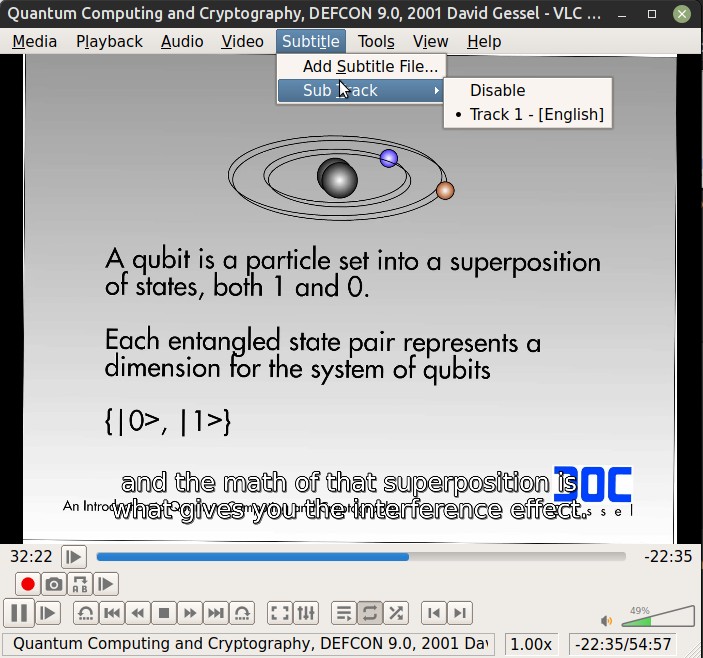
Now your video file has subtitles and these should be selectable in VLC player
Add metadata and chapters with MKVToolNix
Chapter data and additional metadata is our first foray away from ffmpeg to another open source tool called MKVToolNix. Chapter data is easiest (and most reusable) by creating a chapter file using the slide timing data collected previous, but this time in absolute time in HH:MM:SS.sss so it looks like this (with the blank chapter at the out time of the whole video):
CHAPTER01=00:00:00.000
CHAPTER01NAME="Quantum Computing and Cryptography"
CHAPTER02=00:00:28.000
CHAPTER02NAME="1.0 Topics to be Covered"
...
CHAPTER22=00:50:07.000
CHAPTER22NAME="6.0 Practical Implementations"
CHAPTER23=00:51:44.000
CHAPTER23NAME="7.0 Conclusion: Gessel's Law P=2^2^(Y/2) rev: P=2^2^(Y/3.4)"
CHAPTER24=00:54:50.000
CHAPTER24NAME=""
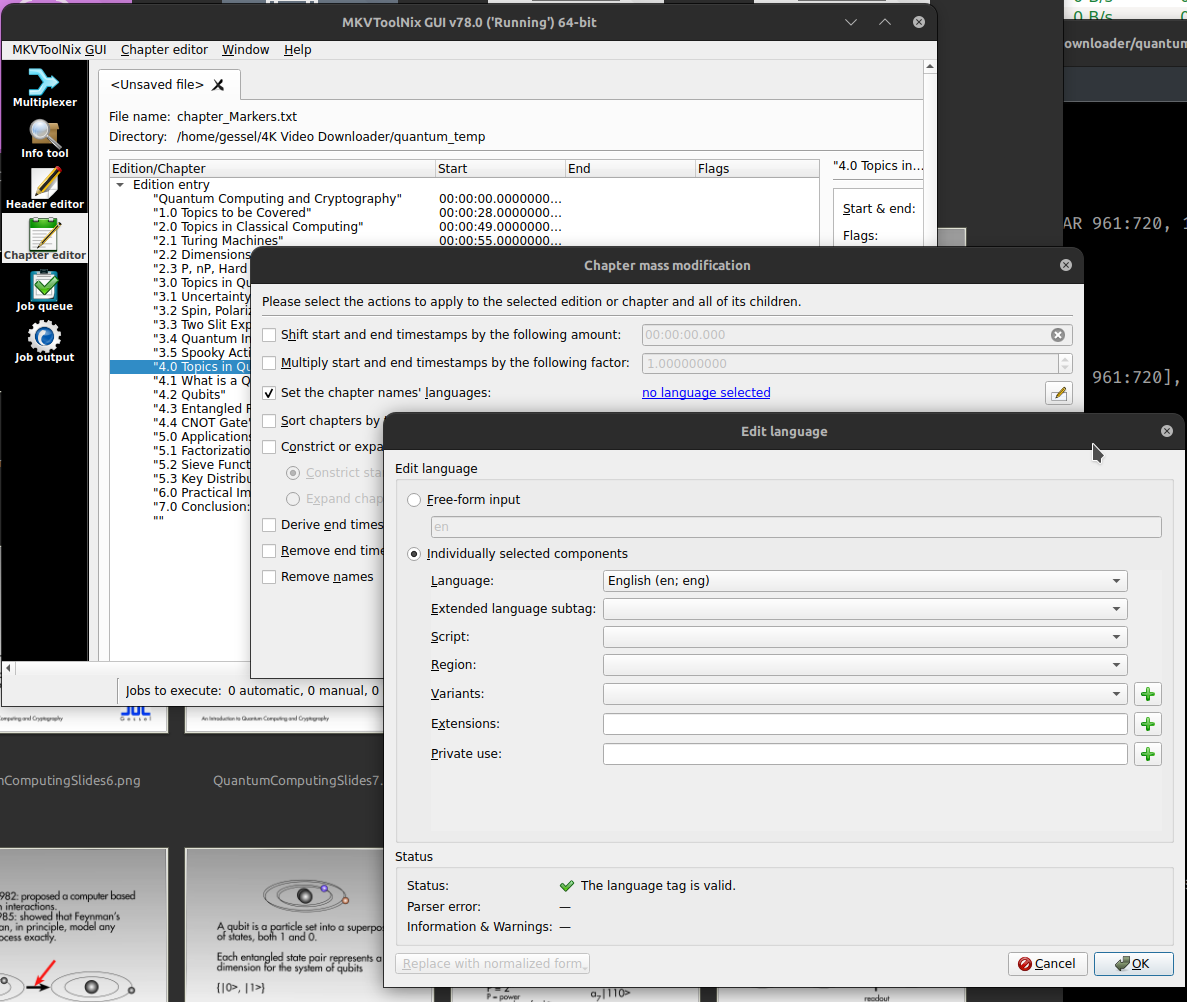
You open this chapters.txt file in the Chapter Editor tab of MKVToolNix and then right click and select “additional modifications” then select the language. Finally, save from the “Chapter editor” menu (top of screen) and select “Save to Matroska or WebM file” and confirm that you’re going to overwrite the no-chapters version (with the addition of the chapter data).
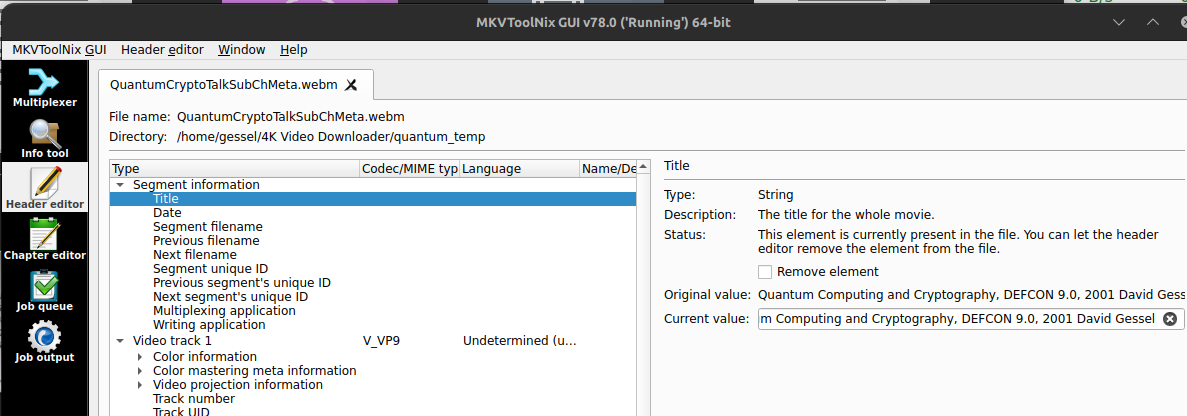
The last tidbit is to add some moderately useful metainformation, at least title and possible date (if relevant). Title, at least, is what’s used as the VLC title and possibly in other places. The MKVToolNix header editor tab will do what’s needed. You want to edit the “Segment information” – I’m not sure where the track information titles show up, so I don’t bother with them, but no harm in editing those either. Then just save with CTRL-S to update your WebM video with the additional metadata.
That’s it, you should now have a well-formatted, searchable, indexible video that will play directly from your own web server without relying on plugins or gifting your data to services like youtube or tiktok or whatever data harvesting service is luring the unwitting to data slaughter with Judas goats of convenience.
Mobotix Notifier in Python – get desktop messages from your cameras
I wrote a little code in python to act as a persistent, small footprint LAN listener for Mobotix cameras IP Notify events. If such a thing is useful to you, the code and a .exe compiled version are linked/inline. It works on both Windows and Linux as python code. For Windows there’s a humongous (14MB) .exe file use if you don’t want to install Python and mess with the command line in power shell.
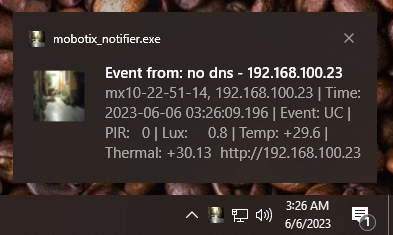
Mobotix cameras have a pretty cool low-level feature by which you can program via the camera web interface a raw IP-packet event to send to a destination if the camera detects a trigger, for example motion, PIR over threshold, noise level, thermal trigger, or the various AI detectors available on the 7 series cameras. Mobotix had a simple notification application, but some of these older bits of code aren’t well supported any more and Linux support didn’t last long at the company, alas. The camera runs Linux, why you’d want a client appliance to run anything but Linux is beyond me, but I guess companies like to overpay for crappy software rather than use a much better, free solution.
I wanted something that would push an otherwise not intrusive notification when the camera triggered for something like a cat coming by for dinner, pushing a desktop notification. Optimally this would be done with broadcast packets over UDP, but Mobotix doesn’t support UDP broadcast IP Notify messaging yet, just TCP, so each recipient address (or DNS name) has to be specified on each camera, rather than just picking a port and having all the listeners tune into that port over broadcast. Hopefully that shortcoming will be fixed soon.
This code runs headless, there’s no interaction. From the command line just ./mobotix_notifier.py & and off it goes. From windows, either the same for the savvy or double click the exe. All it does is listen on port 8008/TCP and if it gets a message from a camera, reach out and grab the current video image, iconify it, then push a notification using the OS’s notification mechanism which appears as a pop-up window for few seconds with a clickable link to open the camera’s web page. It works if you have one or a 100 cameras, but it is not intended for frequent events which would flood the desktop with annoyance, rather a front door camera that might message if someone’s at the door. In a monitoring environment, it might be useful for signaling critical events.
Mobotix Camera Set Up
On the camera side there are just two steps: setting up an IP-Notify action from the Admin Menu and then defining an Action Group from the Setup Menu to trigger it.
The title is the default “SimpleNotify” – that can be anything.
The Destination addresses are the IPs of the listener machines and port numbers. You can add as many as needed but for now it is not possible to send a UDP broadcast message as UDP isn’t supported yet. It may be soon, I’ve requested the capability and I expect the mechanism is just a front end for netcat (nc) as it would be strange to write a custom packet generator when netcat is available. For now, no broadcast, just IP to IP, so you have to manually enumerate all listeners.
I have the profile set for sequential send to all rather than parallel just for debugging, devices further down the list will have lower latency with parallel send.
The data protocol is raw TCP/IP, no UDP option here yet…
The data type is plain text, which is easier to parse at the listener end. The data structure I’m using reads: $(id.nam), $(id.et0) | Time: $(fpr.timestamp) | Event: $(EVT.EST.ACTIVATED) | PIR: $(SEN.PIR) | Lux: $(SEN.LXL) | Temp: $(SEN.TOU.CELSIUS) | Thermal: $(SEN.TTR.CELSIUS) but it can be anything that’s useful.
Mobotix cameras have a robust programming environment for enabling fairly complex “If This Then That” style operations and triggering is no exception. One might reasonably configure the Visual Alarm (now with multiple Frame Colors, another request of mine, so that you can have different visual indicators for different detected events, create different definitions at /admin/Visual Alarm Profiles), a fairly liberal criterion might be used to trigger recording, and a more strict “uh oh, this is urgent” criterion might be used to trigger pushing a message to your new listeners.
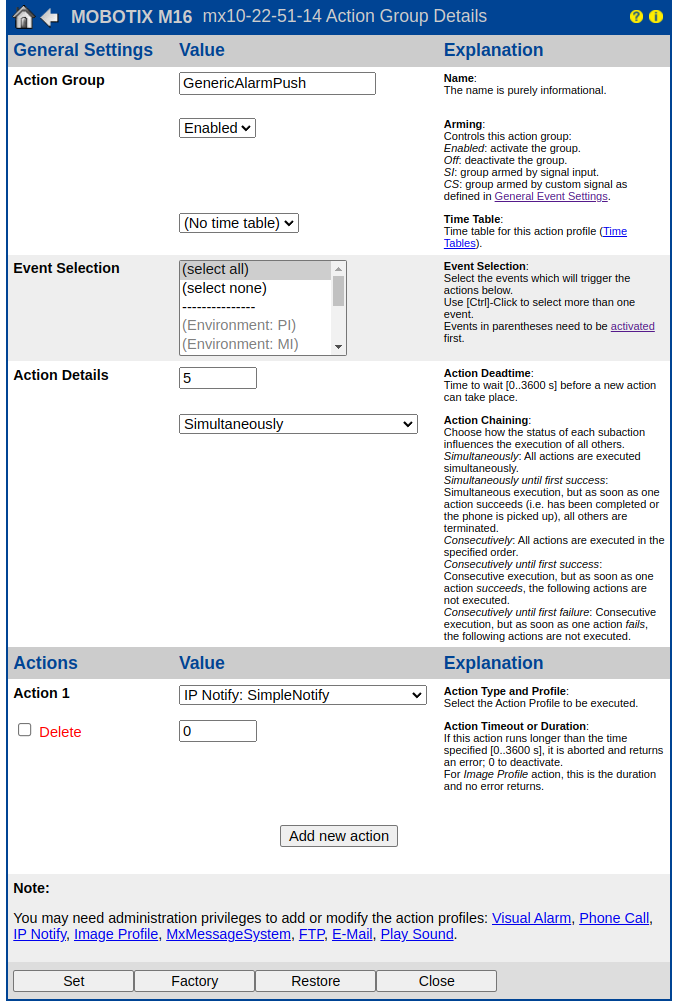
This config should be fairly obvious to anyone familiar with Mobotix camera configuration: it’s configured to trigger at all detected events but not more than once every 5 seconds. given it is pushing a desktop alert, a longer deadtime might be appropriate depending on the specifics of triggering events that are configured.
That’s all that’s needed on the camera end: when a triggering event occurs the camera will take action by making a TCP connection to the IP address enumerated on the selected port and, once the connection is negotiated push the text structure. All we need now is something to listen.
Python Set Up
The provided code can be run as a python “application” but python is an interpreted language and so needs the environment in which to interpret it properly configured. I also provide a compiled exe derived from the python code using PyInstaller, which makes it easier to run without Python on Windows where most users aren’t comfortable with command lines and also integrates more easily with things like startup applications and task manager and the like.
If you’re going to run the python command-line version, you can use these instructions for Windows, or these for Linux to set up Python. Just make sure to install a version more recent than 3.7 (you’d have to work at installing an older version than that). Then, once python is installed and working, install the libraries this script uses in either windows powershell or Linux shell as below. Note that python specifies the 3.x series of python vs. 2.x and is only necessary in systems with earlier version baggage like mine.
python[3] -m pip install plyer dnspython py-notifier pillow --upgrade
Once python is installed, you should be able to run the program from the directory by just typing ./mobotix_notifier.py, obviously after you’ve downloaded the code itself (see below).
Firewalls: Windows and Linux
Linux systems often have Uncomplicated Firewall (UFW) running. The command to open the ports in the firewall to let any camera on the LAN reach the listener is:
sudo ufw allow from 192.168.100.0/24 proto tcp to any port 8008
# if you make a mistake
sudo ufw status numbered
sudo ufw delete 1
This command allows TCP traffic in from the LAN address (192.168.100.0/24, edit as necessary to match your LAN’s subnet) on port 8008. If a broadcast/UDP version comes along, the firewall rule will change a little. You can also reduce the risk surface by limiting the allowed traffic to specific camera IPs if needed.
On windows, the first time the program is run, either the python script or the executable, you’ll get a prompt like
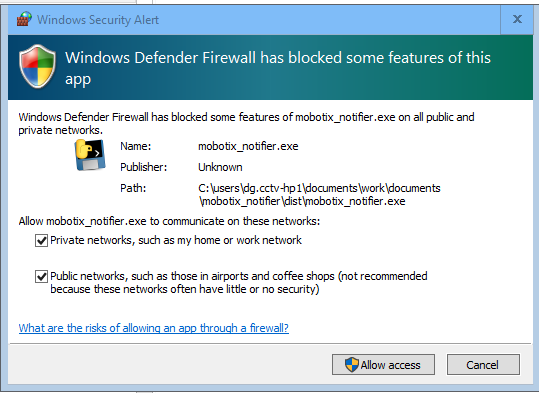
You probably don’t need to allow public networks, but it depends on how you’ve defined your network ranges whether Windows considers your LAN public or private.
Default Icon Setup
One of the features of the program is to grab the camera’s event image and convert it to the alert icon which provides a nearly uselessly low rez visual indicator of the device reporting and the event that caused the trigger. The icon size itself is 256×256 pixels on linux and 128×128 on windows (.ico). Different window managers/themes provide more or less flexibility in defining the alert icons. Mine are kinda weak.
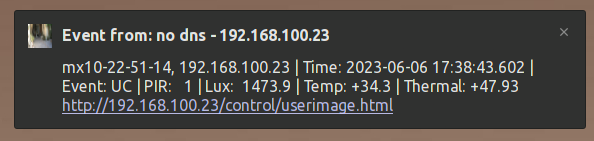 The win-10 notification makes better use of the icon. Older versions of linux had a notification customization tool that seems to have petered out at 16.x, alas. But the icons have some detail if your theme will show them.
Another feature is that the code creates the icon folder if it doesn’t exist. It almost certainly will on Linux but probably won’t on windows unless you’ve run some other Linuxy stuff on your windows box. The directory created on windows is your home directory\.local\share\icons\. On Linux systems, the directory should exist and is ~/.local/share/icons/. In that directory you should copy the default camera icon as “mobotix-cam.ico” like so:

You can put any icon there as your preferred default as long as it is in .ico format, or use the one below (right-click on the image or link and “save as” to download the .ico file with resolution layers):
If, for some reason, the get image routine fails, the code should substitute the above icon so there’s a recognizable visual cue of what the notification is about.
mobotix_notifier.py code
The python code below can be saved as “mobotix_notifier.py” (or anything else you like) and the execution bit set, then it can be run as ./mobotix_notifier.py on Linux or python .\mobotix_notifier.py on Windows. On Linux, the full path to where you’ve installed the command can be set as a startup app and it will run on startup/reboot and just listen in the background. It uses about 13 seconds a day of CPU time on my system.
Click to download the Windows .exe which should download as mobotix_notifier.exe. (14.0MiB) After the above configuration steps of on the camera(s) and firewall are completed it should start silently and run in the background after launch (kill it with task manager if needed) and push desktop alerts as expected. I used “UC” alarms to test rather than waiting for stray cats.
The python code is:
#!/usr/bin/env python3

import requests
from PIL import Image
import socket
from plyer import notification
import io
import os.path

# note windows version needs .ico files
# note windows paths have to be r type to handle
# backslashes in windows paths
# Check operating environment and define path names
# for the message icons accordingly.
# if OS path doesn't exist, then create it.

if os.name == "nt":
    Ipath = r"~\.local\share\icons\mobotix-cam.ico"
    Epath = r"~\.local\share\icons\mobotix-event.ico"
    fIpath = os.path.expanduser(Ipath)
    fEpath = os.path.expanduser(Epath)
    dirpath = os.path.dirname(fEpath)
    if not os.path.exists(dirpath):
        os.makedirs(dirpath)

else:
    Ipath = "~/.local/share/icons/mobotix-cam.png"
    Epath = "~/.local/share/icons/mobotix-event.png"
    fIpath = os.path.expanduser(Ipath)
    fEpath = os.path.expanduser(Epath)
    dirpath = os.path.dirname(fEpath)
    if not os.path.exists(dirpath):
        os.makedirs(dirpath)


def grab_jpeg_image(camera_ip):
    """Grabs a JPEG image from the specified camera IP."""

    # Make a request to the camera IP
    response = requests.get(f"http://{camera_ip}/control/event.jpg", stream=True) # noqa

    # Check if the request was successful
    if response.status_code == 200:
        # Convert the response data to an image
        image = Image.open(io.BytesIO(response.content))

        # Return the image
        return image

    else:
        # import the default icon
        image = Image.open(fIpath)

        # Return the image
        return image


def convert_jpeg_to_png(image, width, height):
    """Converts a JPEG image to a PNG image."""

    # size = width, height

    # Scale the image
    image.thumbnail((width, height), Image.Resampling.LANCZOS)

    # Save the image according to OS convention
    if os.name == "nt":
        icon_sizes = [(16, 16), (32, 32), (48, 48), (64, 64), (128, 128)]
        image.save(fEpath, format='ICO', sizes=icon_sizes)
    else:
        image.save(fEpath)


def iconify(src_ip):

    # Grab the JPEG image from the camera
    image = grab_jpeg_image(src_ip)

    # Convert the JPEG image to a PNG image
    convert_jpeg_to_png(image, 256, 256)


def reverse_dns_lookup(src_ip):

    try:
        return socket.gethostbyaddr(src_ip)[0]
    except socket.gaierror:
        return "no dns"
    except socket.herror:
        return "no dns"


def test_str(answer):
    try:
        return str(answer)
    except TypeError:
        return answer.to_text()


def listener():
    """Listens for incoming connections on port 8008."""

    # Create a socket
    sock = socket.socket(socket.AF_INET, socket.SOCK_STREAM)
    sock.setsockopt(socket.SOL_SOCKET, socket.SO_REUSEADDR, 1)

    # Bind the socket to port 8008
    sock.bind(("0.0.0.0", 8008))

    # Listen for incoming connections
    sock.listen(1)

    while True:
        # Accept an incoming connection
        conn, addr = sock.accept()

        # Receive the payload of the packet
        data = conn.recv(2048)

        # Close the connection
        conn.close()

        # convert from literal string to remove b' prefix of literal string
        data = str(data)[2:-1]

        # Extract the source IP from the address
        src_ip = addr[0]

        # Grab the event image as an icon
        iconify(src_ip)

        # Do a DNS lookup of the source IP
        answer = reverse_dns_lookup(src_ip)

        # Get the hostname from the DNS response
        hostname = test_str(answer)

        # Write the hostname to notify-send

        title = (f"Event from: {hostname} - {src_ip}")
        message = (f"{data} http://{src_ip}/control/userimage.html")

        notification.notify(
            title=title,
            message=message,
            app_icon=fEpath,
            timeout=30,
            toast=False)

        # Echo the data to stdout for debug
        # print(f"Event from {hostname} | {src_ip} {data}")


if __name__ == "__main__":
    listener()
Please note the usual terms of use.
Sidebar featured images only on single post pages
After updating to WordPress 6.x and updating my theme (Clean Black based) and then merging the customizations back in with meld (yes, I really should do a child theme but this is a pretty simple theme so meld is fine), I didn’t really like the way the post thumbnails are shown, prefering to keep it to the right. I mean clean black was last updated in 2014 and while it still works fine, but that was a while ago. Plus I had hand-coded a theme sometime in the naughties and wanted to more or less keep it while taking advantage of some of the responsive features introduced about then.
Pretty much any question one might have, someone has asked it before, and I found some reasonable solutions, some more complex than others. There’s a reasonable 3 modification solution that works by creating another sidebar.php file (different name, same function) that gets called by single.php (and not the main page) that has the modification you want, but that seemed unnecessarily complicated. I settled on a conditional test is_singular which works to limit the get_the_post_thumbnail call to where I wanted and not to invoke it elsewhere. A few of the other options on the same stackexchange thread didn’t work for me, your install may be different. What I settled on (including a map call for geo-tagged posts) is:
<div id="sidebar">

      <?php if (is_singular('post') ) {
           echo get_the_post_thumbnail( $post->ID, 'thumbnail');
           echo GeoMashup::map('height=150&width=300&zoom=5&add_overview_control=false&add_map_type_control=false&add_map_control=false');
           } ?>

	<div class="widgetarea">

	<ul id="sidebarwidgeted">

<?php if (!dynamic_sidebar('Sidebar Top') ) : ?>

	<?php endif; ?>

	</ul>

	</div>

</div>
And I get what i was looking for, a graphical anchor at the top of the single post (but not pages) for the less purely lexically inclined that didn’t clutter the home page or other renderings with a wee bit o php.
Some gnuplot and datamash adventures
I’ve been collecting data on the state of the Ukrainian digital network since about the start of the war on a daily basis, some details of the process are in this post. I was creating and updating maps made with qgis when particularly notable things happened, generally correlated with significant damage to the Ukrainian power infrastructure (and/or data infrastructure). I wanted a way to provide a live update of the feed, and as all such projects go, the real reward was the friends made along the way to an automatically updated “live” summary stats table and graph.
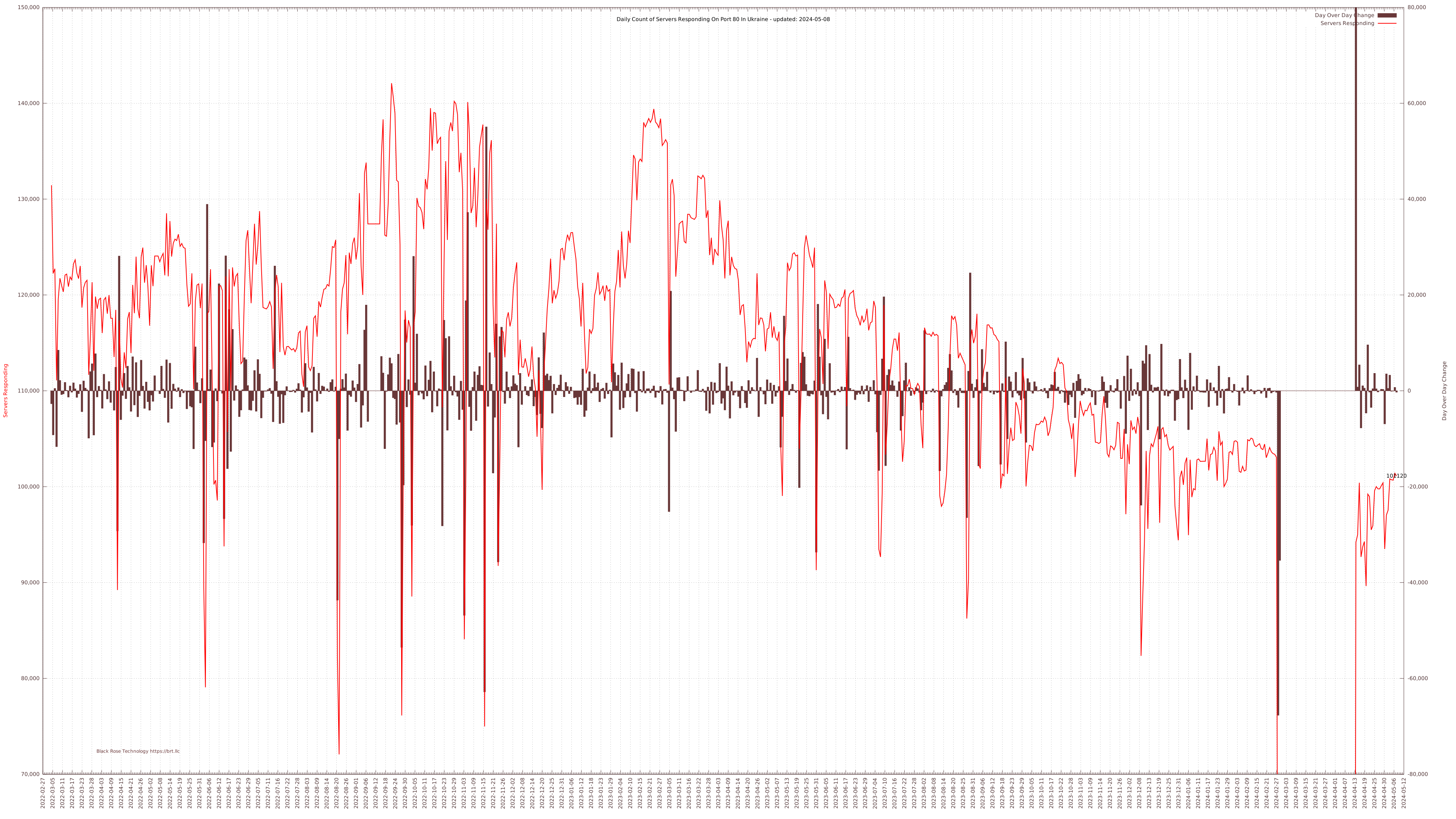
My data collection tools generate some rather large CSV files for the mapping tools, but to keep a running summary, I also extract the daily total of responding servers and compute the day over day change and append those values to a running tally CSV file. A few really great tools from the Free Software Foundation help turn this simple data structure into a nicely formatted (I think) table and graph: datamash and gnuplot. I’m not remotely expert enough to get into the full details of these excellent tools, but I put together some tricks that are working for me and might help someone else trying to do something similar.
Using datamash for Statistical Summaries
Datamash is a great command line tool for getting statistics from text files like logs or CSV files or other relatively accessible and easily managed data sources. It is quite a bit easier to use and less resource intensive than R, or Gnu Octave, but obviously also much more limited. I really only wanted very basic statistics and wanted to be able to get to them from Bash with a cron job calling a simple script and for that sort of work, datamash is the tool of choice.
Basic statistics are easy to compute with datamash; but if you want a thousands grouped comma delimited median value of a data set that looks like 120,915 (say), you might need a slightly more complicated (but still one-liner) command like this:
Median="$(/usr/bin/datamash -t, median 2 < /trend.csv | datamash round 1 | sed ':a;s/\B[0-9]\{3\}\>/,&/;ta')"
Median= Assign the result to the variable $Median
-t, Comma delimited (instead of tab, default)
median one of a bazillion stats datamash can compute
2 use column two of the CSV data set.
< /trend.csv feed the previous command a CSV file nom nom
| datamash round 1 pipe the result back to datamash to round the decimals away
| sed (yadda yadda) pipe that result to sed to insert comma thousands separator*
Once I have these values properly formatted as readable strings, I needed a way to automatically insert those updates into a consistently formatted table like this:
I first create a dummy table with a plugin called TablePress with target dummy values (like +++Median) which I then extract as HTML and save as a template for later modification. With the help of a little external file inclusion code into WordPress, you can pull that formatted but now static HTML back into the post from a server-side file. Now all you need to do is modify the HTML file version of the table using sed via a cron job to replace the dummy values with the datamash computed values and then scp the table code with updated data to the server so it is rendered into the viewed page:
sed -i -e "s/+++Median/$Median/g" "stats_table.html"
/usr/bin/sshpass -P assphrase -f '~/.pass' /usr/bin/scp -r stats_table.html user@site.org:/usr/local/www/wp-content/uploads/stats_table.html
For this specific application the bash script runs daily via cron with appropriate datamash lines and table variable replacements to keep the table updated on a daily basis. It first copies the table template into a working directory, computes the latest values with datamash, then seds those updated values into the working copy of the table template, and scps that over the old version in the wp-content directory for visitor viewing pleasure.
Using gnuplot for Generating a Live Graph
The basic process of providing live data to the server is about the same. A different wordpress plugin, SVG Support, adds support for SVG filetypes within WordPress. I suspect this is not default since svg can contain active code, but a modern website without SVG support is like a fish without a bicycle, isn’t it? SVG is useful in this case in another way, the summary page integrates a scaled image which is linked to the full size SVG file. For bitmapped files, the scaled image (or thumbnail) is generated by downsampling the original (with ImageMagick, optimally, not GD) and that needs an active request (i.e. PHP code) to update. In this case, there’s no need since the SVG thumbnail is the just the original file resized—SVG: Scalable Vector Graphics FTW.
Gnuplot is a impressively full-featured graphing tool with a complex command structure. I had to piece together some details from various sources and then do some sedding to get the final touches as I wanted them. As every plot is different, I’ll just document the bits I pieced together myself, the plotting details go in the gnuplot command script, the other bits in a bash script executed later to add some non-standard formatting to the gnuplot svg output.
Title of the plot
The SVG <title> block is set as “Gnuplot” and I don’t see any way to change that from the command line, so I replaced it with the title I wanted, using a variable for the most recently updated data point extracted by datamash as above:
sed -i -e "s/<title>Gnuplot<\/title>/<title>Ukrainian Servers Responding on port 80 from 2022-03-05 to $LDate<\/title>/g" "/UKR-server-trend.svg" sed -i -e "s/<desc>Produced by GNUPLOT 5.2 patchlevel 2 <\/desc>/<desc>Daily automated update of Ukrainian server response statistics.<\/desc>/g" "/UKR-server-trend.svg"
This title value is used as the tab title. I’m not sure where the <desc> will show up, but likely read by various spiders and is an accessibility thing for online readers.
Last Data Point
I wanted the most recent server count to be visible at the end of the plot. This takes two steps: first plot that data point alone with a label (but no title so it doesn’t show up in the data key/legend) by adding a separate plot of just that last datum like:
"< tail -n 1 '/trend.csv'" u 1:2:2 w labels notitle
This works fine, but if you hover over the data point, it just pops up “gnuplot_plot_4” and I’d rather have more useful data so I sed that out and replace it with some values I got from datamash queries earlier in the script like so:
sed -i -e "s/<title>gnuplot_plot_4<\/title>/<title>Tot: $LTot; Diff: $LDif<\/title>/g" "/UKR-server-trend.svg"
Adding Link Text
SVG supports clickable links, but you can’t (I don’t think) define those URLs in the label command. So first set the visible text with a simple gnuplot label command:
set label "Black Rose Technology https://brt.llc" at graph 0.07,0.03 center tc rgb "#693738" font "copperplate,12"
and then enhance the resulting svg code with a link using good old sed:
sed -i -e "s#<text><tspan font-family=\"copperplate\" >Black Rose Technology https://brt.llc</tspan></text>#<a xlink:href=\"https://brt.llc/\" target=\"__blank\"><text><tspan font-family=\"copperplate\" >Black Rose Technology https://brt.llc</tspan></text></a>#g" "/UKR-server-trend.svg"
Hovertext for the Delta Bars
Adding hovertext to the ends of the daily delta bars was a bit more involved. The SVG <title> type is interpreted by most browsers as a hoverable element but adding visible data labels to the ends of the bars makes the graph icky noisy. Fortunately SVG supports transparent text. To get all this to work, I replot the entire bar graph data series as just labels like so:
'/trend.csv' using 1:3:3 with labels font "arial,4" notitle axes x1y2
But this leaves a very noisy looking graph, so we pull out our trusty sed to set opacity to “0” so they’re hidden:
sed -i -e "s/\(stroke=\"none\" fill=\"black\"\)\( font-family=\"arial\" font-size=\"4.00\"\)/\1 opacity=\"0\"\2/g" "/UKR-server-trend.svg"
and then find the data value and generate a <title> element of that data value using back-references. I must admit, I have not memorized regular expressions to the point where I can just write these and have them work on the first try: gnu’s sed tester is very helpful.
sed -i -e "s/\(<text><tspan font-family=\"arial\" >\)\([-1234567890]*\)<\/tspan><\/text>/\1\2<title>\2<\/title><\/tspan><\/text>/g" "/UKR-server-trend.svg"
And you get hovertext data interrogation. W00t!
Note that cron jobs are executed with different environment variables than user executed scripts, which can result in date formatting variations (which can be set explicitly in gnuplot) and thousands separator and decimal characters (,/.). To get consistent results with a cron job, explicitly set the appropriate locale, either in the script like
#!/bin/bash
LC_NUMERIC=en_US.UTF-8
...
or for all cron jobs as in crontab -e
LC_NUMERIC=en_US.UTF-8
MAILTO=user@domain.com
# .---------------- minute (0 - 59)
# |    .------------- hour (0 - 23)
# |    |      .---------- day of month (1 - 31)
# |    |      |    .------- month (1 - 12) OR jan,feb,mar,apr ...
# |    |      |    |    .---- day of week (0 - 6) (Sunday=0 or 7)  OR sun,mon,tue,wed,thu,fri,sat
# |    |      |    |    |
# *    *      *    *    *    <command to be executed>
The customized SVG file is SCPd to the server as before, replacing the previous day’s. Repeat visitors might have to clear their cache. It’s also important to disable caching on the site for the page, for example if using wp super cache or something, because there’s no signal to the cache management engine that the file has been updated.
Smol bash script for finding oversize media files
Sometimes you want to know if you have media files that are taking up more than their fair share of space. You compressed the file some time ago in an old, inefficient format, or you just need to archive the oversize stuff, this can help you find em. It’s different from file size detection in that it uses mediainfo to determine the media file length and a variety of other useful data bits and wc -c to get the size (so data rate includes any file overhead), and from that computes the total effective data rate. All math is done with bc, which is usually installed. Files are found recursively (descending into sub-directories) from the starting point (passed as first argument) using find.
basic usage would be:
./find-high-rate-media.sh /search/path/tostart/ [min bpp] [min data rate] [min size] > oversize.csv 2>&1
The script will then report media with a rate higher than minimum and size larger than minimum as a tab delimited list of filenames, calculated rate, and calculated size. Piping the output to a file, output.csv, makes it easy to sort and otherwise manipulate in LibreOffice Calc as a tab delimited file. The values are interpreted as the minimum for suppression of output, so any file that exceeds all three minimum triggers will be output to the screen (or .csv file if so redirected).
The script takes four command line variables:
- The starting directory, which defaults to . [defaults to the directory the script is executed in]
- The minimum bits per pixel (including audio, sorry) for exclusions (i.e. more bpp and the filename will be output) [defaults to 0.25 bpp]
- The minimum data rate in kbps [defaults to 1 kbps so files would by default only be excluded by bits per pixel rate]
- The minimum file size in megabytes [defaults to 1mb so files would by default only be excluded by bits per pixel rate]
Save the file as a name you like (such as find-high-rate-media.sh) and # chmod +x find-high-rate-media.sh and run it to find your oversized media.
!/usr/bin/bash
############################# USE #######################################################
# This creates a tab-delimeted CSV file of recursive directories of media files enumerating
# key compression parameters.  Note bits per pixel includes audio, somewhat necessarily given
# the simplicity of the analysis. This can throw off the calculation.
# find_media.sh /starting/path/ [min bits per pixel] [min data rate] [min file size mb]
# /find-high-rate-media.sh /Media 0.2 400 0 > /recomp.csv 2>&1
# The "find" command will traverse the file system from the starting path down.
# if output isn't directed to a CSV file, it will be written to screen. If directed to CSV
# this will generate a tab delimted csv file with key information about all found media files
# the extensions supported can be extended if it isn't complete, but verify that the
# format is parsable by the tools called for extracting media information - mostly mediainfo
# Typical bits per pixel range from 0.015 for a HVEC highly compressed file at the edge of obvious
# degradation to quite a bit higher.  Raw would be 24 or even 30 bits per pixel for 10bit raw.
# Uncompressed YUV video is about 12 bpp.
# this can be useful for finding under and/or overcompressed video files
# the program will suppress output if the files bits per pixel is below the supplied threshold
# to reverse this invert the rate test to " if (( $(bc  <<<"$rate < $maxr") )); then..."
# if a min data rate is supplied, output will be suppressed for files with a lower data rate
# if a min file size is supplied, output will be suppressed for files smaller than this size
########################################################################################

# No argument given?
if [ -z "$1" ]; then
  printf "\nUsage:\n  starting by default in the current directory and searchign recusrively \n"
  dir="$(pwd)"
  else
        dir="$1"
        echo -e "starting in " $dir ""
fi

if [ -z "$2" ]; then
  printf "\nUsage:\n  returning files with bits per pixel greater than default max of .25 bpp \n"
  maxr=0.25
  else
        maxr=$2
        echo -e "returning files with bits per pixel greater than " $maxr " bpp"
fi

if [ -z "$3" ]; then
  printf "\nUsage:\n  returning files with data rate greater than default max of 1 kbps \n"
  maxdr=1
  else
        maxdr=$3
        echo -e "returning files with data rate greater than " $maxdr " kbps"
fi


if [ -z "$4" ]; then
  printf "\nUsage:\n  no min file size provided returning files larger than 1MB \n"
  maxs=1
  else
        maxs=$4
        echo -e "returning files with file size greater than " $maxs " MB  \n\n"
fi


msec="1000"
kilo="1024"
reint='^[0-9]+$'
refp='^[0-9]+([.][0-9]+)?$'

echo -e "file path \t rate bpp \t rate kbps \t V CODEC \t A CODEC \t Frame Size \t FPS \t Runtime \t size MB"

find "$dir" -type f \( -iname \*.avi -o -iname \*.mkv -o -iname \*.mp4 -o -iname \*.wmv -iname \*.m4v \) -print0 | while read -rd $'\0' file
do
  if [[ -f "$file" ]]; then
    bps="0.1"
    size="$(wc -c  "$file" |  awk '{print $1}')"
    duration="$(mediainfo --Inform="Video;%Duration%" "$file")"
    if ! [[ $duration =~ $refp ]] ; then
       duration=$msec
    fi
    seconds=$(bc -l <<<"${duration}/${msec}")
    sizek=$(bc -l <<<"scale=1; ${size}/${kilo}")
    sizem=$(bc -l <<<"scale=1; ${sizek}/${kilo}")
    rate=$(bc -l <<<"scale=1; ${sizek}/${seconds}")
    codec="$(mediainfo --Inform="Video;%Format%" "$file")"
    audio="$(mediainfo --Inform="Audio;%Format%" "$file")"
    framerate="$(mediainfo --Inform="General;%FrameRate%" "$file")"
    if ! [[ $framerate =~ $refp ]] ; then
       framerate=100
    fi
    rtime="$(mediainfo --Inform="General;%Duration/String3%" "$file")"
    width="$(mediainfo --Inform="Video;%Width%" "$file")"
    if ! [[ $width =~ $reint ]] ; then
       width=1
    fi
    height="$(mediainfo --Inform="Video;%Height%" "$file")"
    if ! [[ $height =~ $reint ]] ; then
       height=1
    fi
    pixels=$(bc -l <<<"scale=1; ${width}*${height}*${seconds}*${framerate}")
    bps=$(bc -l <<<"scale=4; ${size}*8/${pixels}")
    if (( $(bc -l <<<"$bps > $maxr") )); then
        if (( $(bc -l <<<"$sizem > $maxs") )); then
            if (( $(bc -l <<<"$rate > $maxdr") )); then
                echo -e "$file" "\t" $bps "\t" $rate "\t" $codec "\t" $audio "\t" $width"x"$height "\t" $framerate "\t" $rtime "\t" $sizem
            fi
        fi
    fi
  fi
done
Results might look like:
Another common task is renaming video files with some key stats on the contents so they’re easier to find and compare. Linux has limited integration with media information (dolphin is somewhat capable, but thunar not so much). This little script also leans on mediainfo command line to append the following to the file name of media files recursively found below a starting directory path:
- WidthxHeight in pixels (e.g. 1920×1080)
- Runtime in HH-MM-SS.msec (e.g. 02-38-15.111) (colons aren’t a good thing in filenames, yah, it is confusingly like a date)
- CODEC name (e.g. AVC)
- Datarate (e.g. 1323kbps)
For example
kittyplay.mp4 -> kittyplay_1280x682_02-38-15.111_AVC_154.3kbps.mp4
The code is also available here.
#!/usr/bin/bash
PATH="/home/gessel/.local/bin:/usr/local/sbin:/usr/local/bin:/usr/sbin:/usr/bin:/sbin:/bin"

############################# USE #######################################################
# find_media.sh /starting/path/ (quote path names with spaces)
########################################################################################

# No argument given?
if [ -z "$1" ]; then
  printf "\nUsage:\n  pass a starting point like \"/Downloads/Media files/\" \n"
  exit 1
fi

msec="1000"
kilo="1024"
s="_"
x="x"
kbps="kbps"
dot="."

find "$1" -type f \( -iname \*.avi -o -iname \*.mkv -o -iname \*.mp4 -o -iname \*.wmv \) -print0 | while read -rd $'\0' file
do
  if [[ -f "$file" ]]; then
    size="$(wc -c  "$file" |  awk '{print $1}')"
    duration="$(mediainfo --Inform="Video;%Duration%" "$file")"
    seconds=$(bc -l <<<"${duration}/${msec}")
    sizek=$(bc -l <<<"scale=1; ${size}/${kilo}")
    sizem=$(bc -l <<<"scale=1; ${sizek}/${kilo}")
    rate=$(bc -l <<<"scale=1; ${sizek}/${seconds}")
    codec="$(mediainfo --Inform="Video;%Format%" "$file")"
    framerate="$(mediainfo --Inform="General;%FrameRate%" "$file")"
    rtime="$(mediainfo --Inform="General;%Duration/String3%" "$file")"
    runtime="${rtime//:/-}"
    width="$(mediainfo --Inform="Video;%Width%" "$file")"
    height="$(mediainfo --Inform="Video;%Height%" "$file")"
    fname="${file%.*}"
    ext="${file##*.}"
    $(mv "$file" "$fname$s$width$x$height$s$runtime$s$codec$s$rate$kbps$dot$ext")
  fi
done
If you don’t have mediainfo installed,
sudo apt update
sudo apt install mediainfo